Templates · List and feed screens · Travel app · Hollow
Hollow Inbox screen
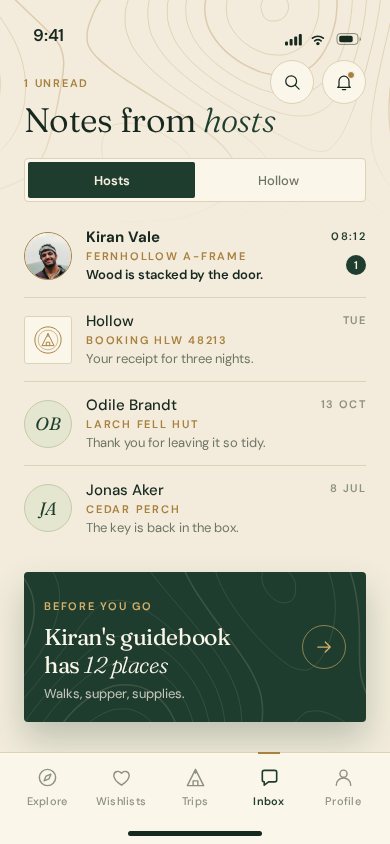
A list screen from Hollow, a cabin and boutique stays app template in a Luxury style. Screen 18 of 25.
Hollow is a complete stays app: welcome, sign in and a code, an explore home with tall cabin cards, search, results, a contour map with price pins, a stay page, reviews, dates, guests, checkout and a booked screen, trips and a trip with arrival details, a host guidebook and a trail with its elevation profile, inbox and host chat, wishlists, a nights away dashboard, a membership, notifications, profile and settings. Forest green, cream and one brass throughout.
| Detail | Value |
|---|---|
| Screen type | List |
| App | Hollow: Cabin and boutique stays |
| Category | Travel |
| Design language | Luxury, light |
| Type | DM Sans |
| Colours | #f3ecdc background, #fbf6ea surface, #17281f text, #6d7566 text-muted, #1f3d2e accent, #f6efdf accent-contrast, #a8813f secondary, #ddd2b8 border, #a4442e danger |
What this screen says
- 1 unread
- Notes from hosts
- Hosts Hollow
- Kiran ValeFernhollow A-frame
- Wood is stacked by the door.
- HollowBooking HLW 48213
- Your receipt for three nights.
- Tue
- OB
- Odile BrandtLarch Fell Hut
- Thank you for leaving it so tidy.
- 13 Oct
- JA
- Jonas AkerCedar Perch
- The key is back in the box.
- 8 Jul
- Before you go
- Kiran's guidebook
- has 12 places
- Walks, supper, supplies.
- Explore
- Wishlists
- Trips
- Inbox
- Profile
Around it in Hollow
More list and feed screens
- Nomad Regions: Travel eSIM data plans
- Tern Sailings: Ferry and island hopping
- Berth Departures: Night trains and sleeper cabins
- Caravan Vans: Campervan rental and road trips
- Layover Departures: Airport guide, gates and lounges
- Permit Documents: Visas and travel documents wallet
- Backroad Trips: Road trip planner with stops
- Bunk Hostels: Hostels and backpacker meetups
- Piazza Tours: Self-guided city walking tours
- Fjord Itinerary: Cruise companion on board
- Atlas Reviews: Maps and navigation
- Kerb History: Parking that reads like a road sign
What makes a good list screen
- Show what people need to decide. Each row should carry just enough to choose: a title, one or two details and a status. Everything else belongs on the detail screen.
- Keep rows consistent. The same information in the same place on every row lets people scan down a column instead of reading each item.
- Group with headings. Dates, categories or status headings break long lists into chunks people can skip through.
- Make common actions quick. Swipe actions, a checkbox or a heart on the row save opening the item for small tasks.
The full list screen guide and every example
Remix Hollow free: describe your own app and it is drawn in this design. Or get its files from $10: Figma, React Native, SwiftUI, Flutter and HTML.