Templates · Form and input screens · Smart home app · Glow
Glow Wake up screen
A form screen from Glow, a light scenes and colour app template in a Gen Z style. Screen 15 of 25.
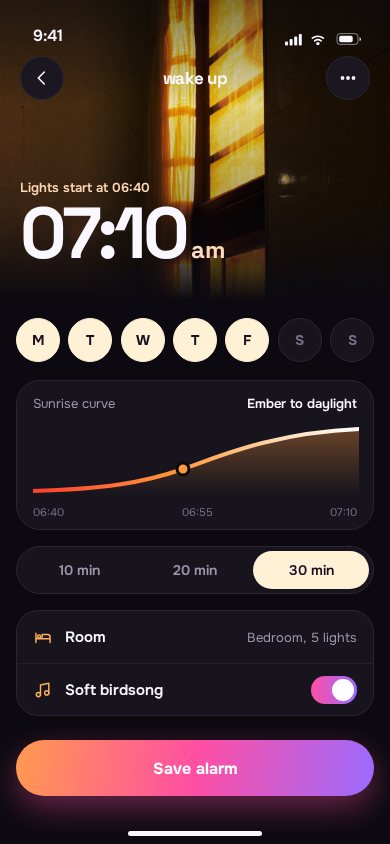
Glow is a complete colour lighting app: welcome, a vibe picker and sign in, a home with the active scene and every room, rooms and a bedroom, a lamp with a brightness dial, a colour wheel, a scene gallery, a scene with its palette, a scene builder and a saved screen, music sync, routines and a sunrise alarm, light insights, a shop with a product page, checkout and a placed order, adding a light, notifications, a Glow+ plan, profile and settings. Warm black with blurred pink, peach, violet and cyan light.
| Detail | Value |
|---|---|
| Screen type | Form |
| App | Glow: Light scenes and colour |
| Category | Smart home |
| Design language | Gen Z, dark |
| Type | Space Grotesk for headings, Onest for text |
| Colours | #0c0a10 background, #17141d surface, #fbf7ff text, #9d95ab text-muted, #ff4fa3 accent, #ffffff accent-contrast, #ffb057 secondary, #2c2634 border, #ff5a5f danger |
What this screen says
- wake up
- Lights start at 06:40
- 07:10am
- M T W T F S S
- Sunrise curve Ember to daylight
- 10 min 20 min 30 min
- Room Bedroom, 5 lights
- Soft birdsong
- Save alarm
Around it in Glow
More form and input screens
- Decibel Group rooms: Multi-room speakers
- Nursery Log sleep: Baby monitor camera and sleep
- Porch Motion zones: Home security cameras
- Sundial Battery mode: Solar panels and home battery
- Puddle Edit schedule: Garden watering and sprinklers
- Upkeep Log task: Home maintenance calendar
- Kelvin Edit period: Climate and thermostat
- Tagged Your policy: Home inventory for insurance
- Lobby New guest pass: Apartment building app
- Sweep Edit map: Robot vacuum and mop
- Dusk New scenario: Smart home scenarios
- Lumen Add device: Smart home energy
Every smart home app form screen
What makes a good form screen
- Ask only what you need. Every field is a reason to stop. Remove optional fields or move them to later.
- Labels above fields. Visible labels stay readable while people type; placeholder-only labels disappear.
- Use the right keyboard and input. Number pads for amounts, email keyboards for email, pickers for dates and autofill for addresses and codes.
- Validate as people go. Show problems next to the field when people leave it, in words that say how to fix them.
The full form screen guide and every example
Remix Glow free: describe your own app and it is drawn in this design. Or get its files from $10: Figma, React Native, SwiftUI, Flutter and HTML.