Templates · Player, camera and editor screens · Productivity app · Glossa
Glossa Camera screen
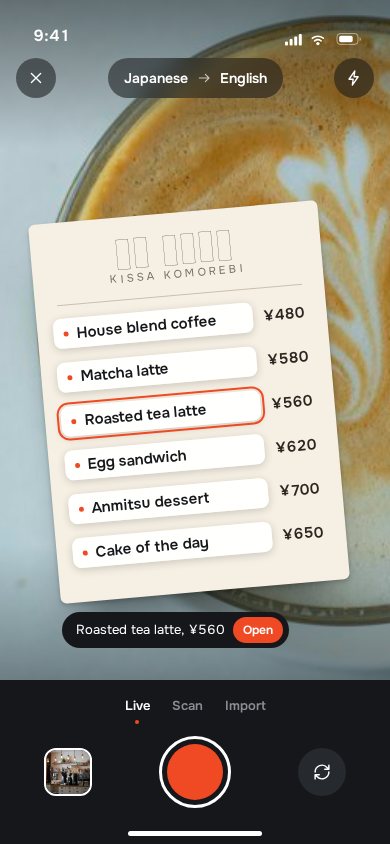
A media screen from Glossa, a productivity app template in a Minimal style. Screen 9 of 25.
Glossa is a complete translation app: welcome, language setup, sign in, a translator home, a full result with alternatives and examples, a language picker, voice and face to face conversation, live camera translation and a scanned menu, history, saved phrases and a phrasebook, a dictionary word page, documents, offline languages, practice cards, monthly insights, a Pro plan with checkout and confirmation, notifications, profile and settings. Off white and ink with one vermilion accent.
| Detail | Value |
|---|---|
| Screen type | Media |
| App | Glossa: Translate text, voice and camera |
| Category | Productivity |
| Design language | Minimal, light |
| Type | Fraunces for headings, Onest for text |
| Colours | #fbfbfa background, #ffffff surface, #f1f1ee surface-muted, #15171a text, #80838a text-muted, #ef4a23 accent, #fde8e1 accent-soft, #15171a secondary, #ebebe7 border, #1f9d6b success |
What this screen says
- 喫茶 こもれび
- KISSA KOMOREBI
- ブレンドコーヒー ¥480
- House blend coffee
- 抹茶ラテ ¥580
- Matcha latte
- ほうじ茶ラテ ¥560
- Roasted tea latte
- 玉子サンド ¥620
- Egg sandwich
- あんみつ ¥700
- Anmitsu dessert
- 本日のケーキ ¥650
- Cake of the day
- Japanese English
- Roasted tea latte, ¥560Open
- Live Scan Import
Around it in Glossa
More player, camera and editor screens
- Shipyard Attachment: Issue tracking for product teams
- Canvas Prototype: Design files and comments on mobile
- Merge Code: Code, pull requests and reviews
- Query Images: AI answers with sources
- Layout Editor: Design anything from templates
- Beacon Play sound: Find your devices and people
- Staffroom Scan receipt: HR, payslips and time off
- Ping Video test: Internet speed test
- Glance Camera: Visual search with the camera
- Replay Recording: Record and share screen videos
- Easel Board: Collaborative whiteboard
- Token Scan code: Two-factor codes and sign-in approvals
Every productivity app media screen
What makes a good media player screen
- Content takes the space. Artwork, video or the camera view should fill most of the screen.
- Primary controls in the thumb zone. Play and pause, the shutter or the main tool, large and low on the screen.
- Show progress and position. A scrubber with elapsed and remaining time, or the step in a lesson.
- Hide secondary controls until needed. Lyrics, queue, filters and advanced tools can live behind a tap or a swipe.
The full media player screen guide and every example
Remix Glossa free: describe your own app and it is drawn in this design. Or get its files from $10: Figma, React Native, SwiftUI, Flutter and HTML.