Templates · Player, camera and editor screens · Productivity app · Merge
Merge Code screen
A media screen from Merge, a productivity app template in a Dark-first style. Screen 9 of 25.
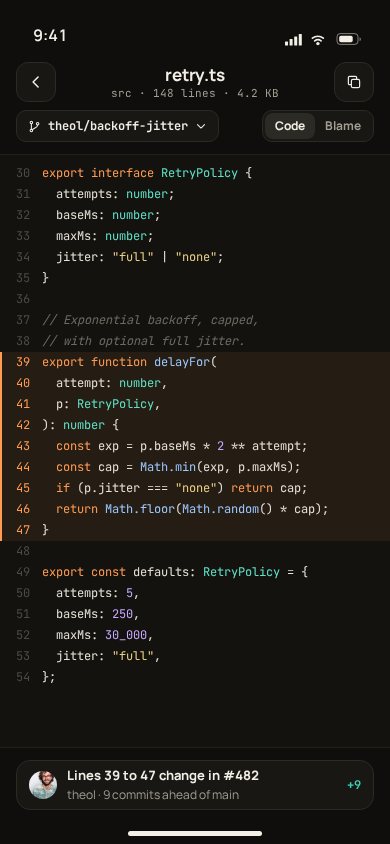
Merge is a complete code review app for your phone: welcome, sign in and two-step verification, a home with your work and reviews waiting, an inbox, search across repositories, pull requests and code, a repository with its files, a code viewer and commits, pull requests with a conversation timeline, a diff with inline comments, submitting a review, live checks with a streaming log, a merge confirmation and the merged state, issues with a detail and a new issue form, repository insights, a release, a Pro plan, profile and settings. Espresso black and charcoal with apricot, teal and rose.
| Detail | Value |
|---|---|
| Screen type | Media |
| App | Merge: Code, pull requests and reviews |
| Category | Productivity |
| Design language | Dark-first, dark |
| Type | JetBrains Mono for headings, Manrope for text |
| Colours | #0f0e0c background, #181714 surface, #f4efe6 text, #a39d92 text-muted, #ff9b52 accent, #1d1006 accent-contrast, #3fd0b4 secondary, #2c2a25 border, #ff6680 danger |
What this screen says
- retry.ts
- src · 148 lines · 4.2 KB
- theol/backoff-jitter
- Code Blame
- 30export interface RetryPolicy {
- 31 attempts: number ;
- 32 baseMs: number ;
- 33 maxMs: number ;
- 34 jitter: "full" | "none" ;
- 35}
- 37// Exponential backoff, capped,
- 38// with optional full jitter.
- 39export function delayFor (
- 40 attempt: number ,
- 41 p: RetryPolicy ,
- 42): number {
- 43 const exp = p.baseMs * 2 ** attempt;
- 44 const cap = Math.min (exp, p.maxMs);
- 45 if (p.jitter === "none" ) return cap;
- 46 return Math.floor (Math.random () * cap);
- 47}
- 49export const defaults: RetryPolicy = {
- 50 attempts: 5 ,
- 51 baseMs: 250 ,
- 52 maxMs: 30_000 ,
- 53 jitter: "full" ,
- 54};
- Lines 39 to 47 change in #482
- theol · 9 commits ahead of main
Around it in Merge
More player, camera and editor screens
- Beacon Play sound: Find your devices and people
- Staffroom Scan receipt: HR, payslips and time off
- Ping Video test: Internet speed test
- Glance Camera: Visual search with the camera
- Replay Recording: Record and share screen videos
- Easel Board: Collaborative whiteboard
- Token Scan code: Two-factor codes and sign-in approvals
- Beam Preview: Send big files
- Parchment Editing: Documents, edit and share
- Lectern Editor: Slides and presenter remote
- Ringer Incoming call: Phone, contacts and voicemail
- Pipeline Voice note: Sales CRM on the road
Every productivity app media screen
What makes a good media player screen
- Content takes the space. Artwork, video or the camera view should fill most of the screen.
- Primary controls in the thumb zone. Play and pause, the shutter or the main tool, large and low on the screen.
- Show progress and position. A scrubber with elapsed and remaining time, or the step in a lesson.
- Hide secondary controls until needed. Lyrics, queue, filters and advanced tools can live behind a tap or a swipe.
The full media player screen guide and every example
Remix Merge free: describe your own app and it is drawn in this design. Or get its files from $10: Figma, React Native, SwiftUI, Flutter and HTML.