Templates · Settings screens · Finance app · Giftly
Giftly Settings screen
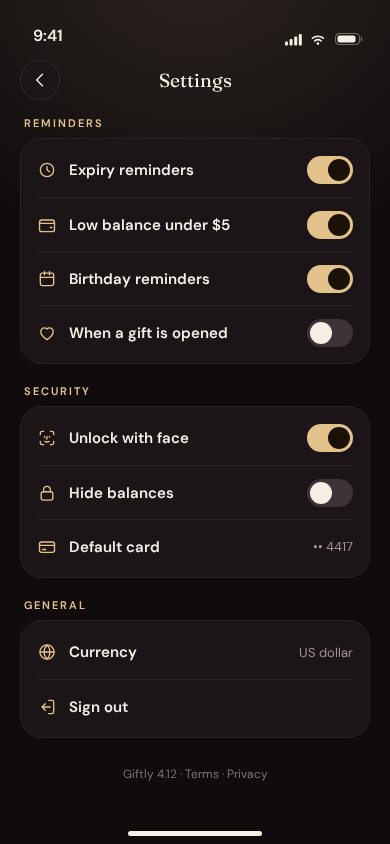
A settings screen from Giftly, a finance app template in a Luxury style. Screen 25 of 25.
Giftly is a complete gift card app: welcome and sign in, a home with the wallet balance, quick actions, occasions and upcoming birthdays, browse by occasion and shop, a shop page, card design, amount, a video or written note, scheduled delivery by text or email, checkout and a sent confirmation, the recipient's unwrap reveal, a wallet of stored cards with balances, a card with its history, a barcode to redeem at the till, scanning a plastic card in and its added state, a group gift and chip in, spending insights, sent gifts, reminders for low balances and expiry, a Reserve plan, profile and settings. Plum black with champagne gold and a soft rose.
| Detail | Value |
|---|---|
| Screen type | Settings |
| App | Giftly: Gift cards, sent and stored |
| Category | Finance |
| Design language | Luxury, dark |
| Type | Fraunces for headings, DM Sans for text |
| Colours | #100c0e background, #1b1518 surface, #f6efe6 text, #a39398 text-muted, #e2c28a accent, #1a1206 accent-contrast, #e7a59a secondary, #2c2327 border, #ff7a6e danger |
What this screen says
- Settings
- Reminders
- Expiry reminders
- Low balance under $5
- Birthday reminders
- When a gift is opened
- Security
- Unlock with face
- Hide balances
- Default card
- •• 4417
- General
- Currency
- US dollar
- Sign out
- Giftly 4.12 · Terms · Privacy
Around it in Giftly
More settings screens
- Levy Settings: Taxes for freelancers
- Bullion Settings: Gold and silver savings
- Wage Settings: Get paid as you work
- Keystone Settings: Mortgage and home loan tracker
- Rebate Settings: Cashback card and rewards
- Aegis Settings: Insurance policies and claims
- Till Settings: Card reader and sales for small shops
- Strike Settings: Options trading
- Prism Settings: Net worth across every account
- Folio Settings: Stocks and ETF investing
- Compound Settings: Mutual funds and SIPs
- Halden Settings: Premium neobank
Every finance app settings screen
What makes a good settings screen
- Group options into clear sections. Account, notifications, privacy, appearance and help, with headings, so people scan to the right group.
- Label settings by their effect. "Daily reminder at 8:00" is clearer than "Reminders". Add a short description under options that need one.
- Use the right control. Toggles for on and off, a row that opens a list for choices, and sliders only for ranges.
- Apply changes immediately. Most mobile settings take effect when changed, with no Save button to forget.
The full settings screen guide and every example
Remix Giftly free: describe your own app and it is drawn in this design. Or get its files from $10: Figma, React Native, SwiftUI, Flutter and HTML.