Templates · Settings screens · Finance app · Compound
Compound Settings screen
A settings screen from Compound, a mutual funds and SIPs app template in a Minimal style. Screen 25 of 25.
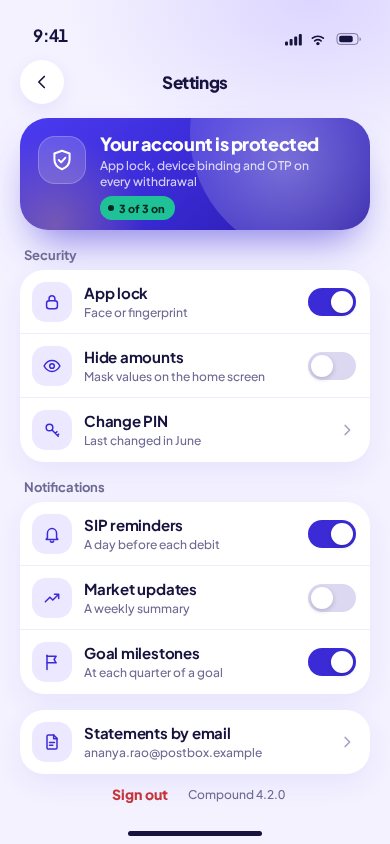
Compound is a complete mutual fund app for Indian investors: welcome, mobile sign in with OTP, KYC, a home with the portfolio value and XIRR, fund discovery, lists and fund pages with returns and a risk meter, holdings, compare, a SIP calculator, starting a SIP with an autopay mandate, one time investments, an order confirmation, investments, SIPs, goals, portfolio analysis, tax, transactions, profile and settings. Lavender white with deep indigo, marigold and mint, amounts in rupees with Indian grouping.
| Detail | Value |
|---|---|
| Screen type | Settings |
| App | Compound: Mutual funds and SIPs |
| Category | Finance |
| Design language | Minimal, light |
| Type | Plus Jakarta Sans |
| Colours | #f4f2ff background, #ffffff surface, #17133f text, #6e6a93 text-muted, #3a2bd6 accent, #ffffff accent-contrast, #ffc24a secondary, #e7e3fb border, #e5484d danger |
What this screen says
- Settings
- Your account is protected
- App lock, device binding and OTP on every withdrawal
- 3 of 3 on
- Security
- App lock
- Face or fingerprint
- Hide amounts
- Mask values on the home screen
- Change PIN
- Last changed in June
- Notifications
- SIP reminders
- A day before each debit
- Market updates
- A weekly summary
- Goal milestones
- At each quarter of a goal
- Statements by email
- ananya.rao@postbox.example
- Sign out
- Compound 4.2.0
Around it in Compound
More settings screens
- Wage Settings: Get paid as you work
- Keystone Settings: Mortgage and home loan tracker
- Rebate Settings: Cashback card and rewards
- Aegis Settings: Insurance policies and claims
- Till Settings: Card reader and sales for small shops
- Strike Settings: Options trading
- Prism Settings: Net worth across every account
- Folio Settings: Stocks and ETF investing
- Halden Settings: Premium neobank
- Billable Settings: Time tracking and invoices, kept like a ledger
- Lease Settings: Your tenancy, drawn to plan
- Claim Settings: Expenses, filed like a till receipt
Every finance app settings screen
What makes a good settings screen
- Group options into clear sections. Account, notifications, privacy, appearance and help, with headings, so people scan to the right group.
- Label settings by their effect. "Daily reminder at 8:00" is clearer than "Reminders". Add a short description under options that need one.
- Use the right control. Toggles for on and off, a row that opens a list for choices, and sliders only for ranges.
- Apply changes immediately. Most mobile settings take effect when changed, with no Save button to forget.
The full settings screen guide and every example
Remix Compound free: describe your own app and it is drawn in this design. Or get its files from $10: Figma, React Native, SwiftUI, Flutter and HTML.