Templates · Settings screens · Finance app · Rebate
Rebate Settings screen
A settings screen from Rebate, a cashback card and rewards app template in a Gen Z style. Screen 25 of 25.
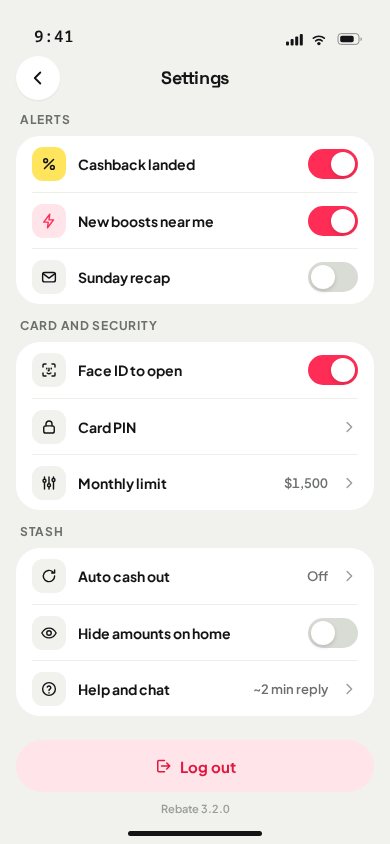
Rebate is a complete cashback card app: welcome, how it works, pick your card, a text code, a home with your stash and live boosts, the card with freeze and limits, activity, a purchase with its cashback split, boosts to browse and switch on, search, a map of boosts nearby, a stash dashboard, cash out with review and success, quests with a live progress map, a scratch card, receipt scanning, invites, notifications, a Plus plan, profile and settings. Off white and white with cherry, butter yellow and ink.
| Detail | Value |
|---|---|
| Screen type | Settings |
| App | Rebate: Cashback card and rewards |
| Category | Finance |
| Design language | Gen Z, light |
| Type | Space Grotesk for headings, Plus Jakarta Sans for text |
| Colours | #f1f2ee background, #ffffff surface, #141416 text, #6c706d text-muted, #ff2d55 accent, #ffffff accent-contrast, #ffe45e secondary, #e3e4df border, #e0173f danger |
What this screen says
- Settings
- Alerts
- Cashback landed
- New boosts near me
- Sunday recap
- Card and security
- Face ID to open
- Card PIN
- Monthly limit
- Stash
- Auto cash out
- Off
- Hide amounts on home
- Help and chat
- ~2 min reply
- Log out
- Rebate 3.2.0
Around it in Rebate
More settings screens
- Ticker Settings: Stock investing
- Burrow Settings: Shared savings pots
- Remit Settings: International money transfer
- Piggy Settings: Pocket money for kids
- Settle Settings: Bill payments and banking
- Fathom Security: Crypto wallet
- Marigold Card settings: Mobile banking
- Zentra Settings: Crypto trading
- Payday Settings: Payroll for small teams
- Roundup Settings: Invest your spare change
- Envelope Settings: Give every dollar a job
- Recur Settings: Track and cancel subscriptions
Every finance app settings screen
What makes a good settings screen
- Group options into clear sections. Account, notifications, privacy, appearance and help, with headings, so people scan to the right group.
- Label settings by their effect. "Daily reminder at 8:00" is clearer than "Reminders". Add a short description under options that need one.
- Use the right control. Toggles for on and off, a row that opens a list for choices, and sliders only for ranges.
- Apply changes immediately. Most mobile settings take effect when changed, with no Save button to forget.
The full settings screen guide and every example
Remix Rebate free: describe your own app and it is drawn in this design. Or get its files from $10: Figma, React Native, SwiftUI, Flutter and HTML.