Templates · Settings screens · Finance app · Keystone
Keystone Settings screen
A settings screen from Keystone, a mortgage and home loan tracker app template in an Enterprise style. Screen 25 of 25.
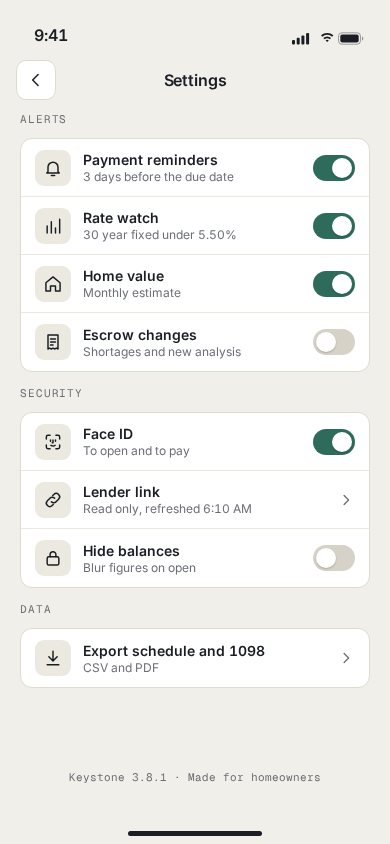
Keystone is a complete home loan tracker: welcome, sign in and linking a lender, a home with the equity arch and the next payment, loan details, the full amortization schedule, a payment breakdown and history, making a payment with extra principal, review and confirmation, a payoff planner, refinance offers with a break-even chart, a live rate lock, home value, property, escrow, equity and PMI removal, documents and a statement viewer, a Pro plan, notifications, profile and settings. Limestone and white with oxblood, verdigris and ochre.
| Detail | Value |
|---|---|
| Screen type | Settings |
| App | Keystone: Mortgage and home loan tracker |
| Category | Finance |
| Design language | Enterprise, light |
| Type | Fraunces for headings, Inter for text |
| Colours | #f1efe9 background, #ffffff surface, #1a1d24 text, #6c6e76 text-muted, #7a2236 accent, #ffffff accent-contrast, #2e6b5b secondary, #dfdbd1 border, #b4361f danger |
What this screen says
- Settings
- Alerts
- Payment reminders
- 3 days before the due date
- Rate watch
- 30 year fixed under 5.50%
- Home value
- Monthly estimate
- Escrow changes
- Shortages and new analysis
- Security
- Face ID
- To open and to pay
- Lender link
- Read only, refreshed 6:10 AM
- Hide balances
- Blur figures on open
- Data
- Export schedule and 1098
- CSV and PDF
- Keystone 3.8.1 · Made for homeowners
Around it in Keystone
More settings screens
- Claim Settings: Expenses, filed like a till receipt
- Tally Settings: Monthly budgeting
- Divvy Settings: Split bills with friends
- Ticker Settings: Stock investing
- Burrow Settings: Shared savings pots
- Remit Settings: International money transfer
- Piggy Settings: Pocket money for kids
- Settle Settings: Bill payments and banking
- Fathom Security: Crypto wallet
- Marigold Card settings: Mobile banking
- Zentra Settings: Crypto trading
- Payday Settings: Payroll for small teams
Every finance app settings screen
What makes a good settings screen
- Group options into clear sections. Account, notifications, privacy, appearance and help, with headings, so people scan to the right group.
- Label settings by their effect. "Daily reminder at 8:00" is clearer than "Reminders". Add a short description under options that need one.
- Use the right control. Toggles for on and off, a row that opens a list for choices, and sliders only for ranges.
- Apply changes immediately. Most mobile settings take effect when changed, with no Save button to forget.
The full settings screen guide and every example
Remix Keystone free: describe your own app and it is drawn in this design. Or get its files from $10: Figma, React Native, SwiftUI, Flutter and HTML.