Templates · Success and confirmation screens · Fitness app · Forge
Forge Workout done screen
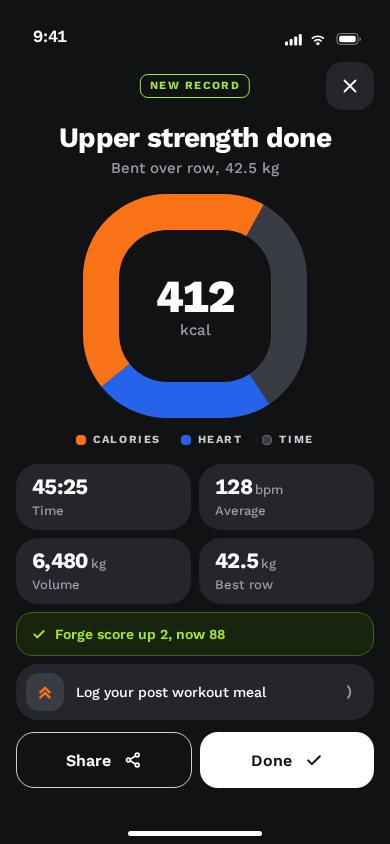
A success screen from Forge, an AI fitness and nutrition app template in a Dark-first style. Screen 11 of 25.
Forge is a complete AI fitness and nutrition app: onboarding, sign in, goal setup, a home with fitness metrics and today's workout, a fitness score, the workout library, workout and exercise details, a live workout, a tracked run on a map, heart rate, a nutrition day with macros, meal logging, a food scan, calories, sleep, an AI coach chat with voice, progress and body stats, a Pro plan, profile and settings. Near black and charcoal with hot orange, cobalt blue and black and white photography.
| Detail | Value |
|---|---|
| Screen type | Success |
| App | Forge: AI fitness and nutrition |
| Category | Health and fitness |
| Design language | Dark-first, dark |
| Type | Work Sans |
| Colours | #111214 background, #24262b surface, #ffffff text, #9a9da6 text-muted, #f97316 accent, #ffffff accent-contrast, #2563eb secondary, #393c43 border, #f43f5e danger |
What this screen says
- NEW RECORD
- Upper strength done
- Bent over row, 42.5 kg
- 412kcal
- CALORIES HEART TIME
- 45:25Time
- 128bpmAverage
- 6,480kgVolume
- 42.5kgBest row
- Forge score up 2, now 88
- Log your post workout meal
- Share
- Done
Around it in Forge
More success and confirmation screens
- Vantage Synced: Sports watch companion
- Labwork Booked: Book blood tests and see results
- Segment Saved: Runs and rides with friends
- Nightly Workout saved: Smart ring sleep and readiness
- Pillbox Order placed: Pharmacy refills and medicine reminders
- Rise Morning report: Alarm clock and sleep cycles
- Ward Checked in: Patient portal for results, visits and messages
- Level Order placed: Glucose monitor companion
- Reformer Booked: Pilates studio booking
- Sip Goal reached: Water intake and hydration
- Mend Session done: Physio and rehab exercises
- Tabata Workout done: HIIT interval timer
Every fitness app success screen
What makes a good confirmation screen
- Confirm in the headline. "Payment sent", "Table booked for Friday at 8" or "Lesson complete" in plain words, with a clear success colour or icon.
- Repeat the key details. Amount, date, reference number or score, so people do not need to check elsewhere that the right thing happened.
- Say what happens next. When the order arrives, when the money lands, when the next lesson unlocks.
- Offer the next step. Track the order, add to calendar, share, or start the next lesson. One primary action and a way back home.
The full confirmation screen guide and every example
Remix Forge free: describe your own app and it is drawn in this design. Or get its files from $10: Figma, React Native, SwiftUI, Flutter and HTML.