Templates · Success and confirmation screens · Fitness app · Tabata
Tabata Workout done screen
A success screen from Tabata, an HIIT interval timer app template in a Neubrutalism style. Screen 13 of 25.
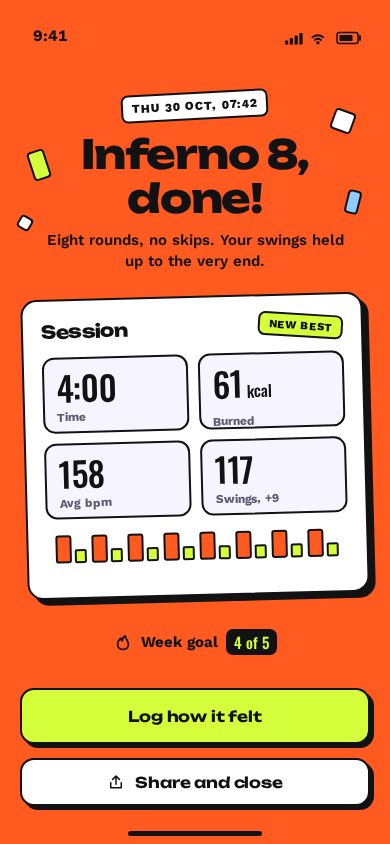
Tabata is a complete HIIT interval timer: welcome, a goal picker, sign in, a home with today's round strip and streak, a workout library with search, workout and exercise pages, a timer builder, a get ready count in, a live work phase and a rest phase, a finish screen and an effort log, history and a past session with heart rate, weekly stats, live coached classes with booking and a confirmation, a Plus plan, notifications, profile and settings. Lilac paper, black outlines, blaze orange work and acid lime rest.
| Detail | Value |
|---|---|
| Screen type | Success |
| App | Tabata: HIIT interval timer |
| Category | Health and fitness |
| Design language | Neubrutalism, light |
| Type | Unbounded for headings, Work Sans for text |
| Colours | #ece9fb background, #ffffff surface, #121212 text, #5e5a72 text-muted, #ff5a1f accent, #121212 accent-contrast, #d4ff3a secondary, #121212 border, #e8253f danger |
What this screen says
- Thu 30 Oct, 07:42
- Inferno 8, done!
- Eight rounds, no skips. Your swings held up to the very end.
- Session
- New best
- 4:00Time
- 61 kcalBurned
- 158Avg bpm
- 117Swings, +9
- Week goal 4 of 5
- Log how it felt
- Share and close
Around it in Tabata
More success and confirmation screens
- Velo Booked: Live and on-demand indoor cycling
- Vantage Synced: Sports watch companion
- Labwork Booked: Book blood tests and see results
- Segment Saved: Runs and rides with friends
- Nightly Workout saved: Smart ring sleep and readiness
- Pillbox Order placed: Pharmacy refills and medicine reminders
- Rise Morning report: Alarm clock and sleep cycles
- Ward Checked in: Patient portal for results, visits and messages
- Level Order placed: Glucose monitor companion
- Reformer Booked: Pilates studio booking
- Sip Goal reached: Water intake and hydration
- Mend Session done: Physio and rehab exercises
Every fitness app success screen
What makes a good confirmation screen
- Confirm in the headline. "Payment sent", "Table booked for Friday at 8" or "Lesson complete" in plain words, with a clear success colour or icon.
- Repeat the key details. Amount, date, reference number or score, so people do not need to check elsewhere that the right thing happened.
- Say what happens next. When the order arrives, when the money lands, when the next lesson unlocks.
- Offer the next step. Track the order, add to calendar, share, or start the next lesson. One primary action and a way back home.
The full confirmation screen guide and every example
Remix Tabata free: describe your own app and it is drawn in this design. Or get its files from $10: Figma, React Native, SwiftUI, Flutter and HTML.