Templates · Success and confirmation screens · Fitness app · Level
Level Order placed screen
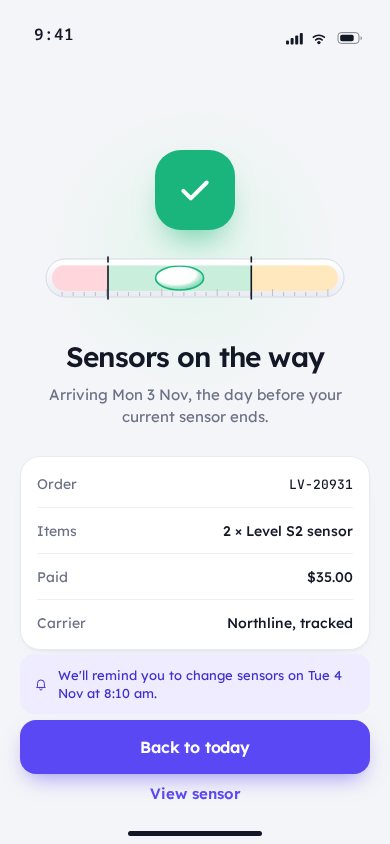
A success screen from Level, a glucose monitor companion app template in a Clinical style. Screen 21 of 25.
Level is a complete companion for a continuous glucose monitor: welcome, sign in, sensor pairing and target range setup, a today screen with the live reading in the level vial, a 24 hour graph, a single reading, logging carbs, insulin and exercise, a meal camera, a meal's glucose response, food search, the logbook, an urgent low alert, alert settings, 14 day insights with an ambulatory glucose profile, time in range, sensor life, a care team, a clinic report, a sensor refill checkout with confirmation, Level Plus, notifications, profile and settings. Cool white and ink navy with signal violet, range green, amber for highs and coral red for lows.
| Detail | Value |
|---|---|
| Screen type | Success |
| App | Level: Glucose monitor companion |
| Category | Health and fitness |
| Design language | Clinical, light |
| Type | JetBrains Mono for headings, Lexend for text |
| Colours | #f4f5f8 background, #ffffff surface, #121826 text, #6b7285 text-muted, #5a48f5 accent, #ffffff accent-contrast, #19b57c secondary, #e6e8ef border, #ef4a5a danger |
What this screen says
- Sensors on the way
- Arriving Mon 3 Nov, the day before your current sensor ends.
- Order LV-20931
- Items 2 × Level S2 sensor
- Paid $35.00
- Carrier Northline, tracked
- We'll remind you to change sensors on Tue 4 Nov at 8:10 am.
- Back to today
- View sensor
Around it in Level
More success and confirmation screens
- Mend Session done: Physio and rehab exercises
- Tabata Workout done: HIIT interval timer
- Jab Workout complete: Boxing workouts with a smart bag
- Exhale Session complete: Breathwork sessions
- Bump Booked: Pregnancy week by week
- Locker Booked: Gym membership and class booking
- Morsel Streak: AI calorie tracker
- Cradle Logged: Baby tracker
- Medly Visit booked: Doctor on call
- Donor Booked: Blood donation, counted drop by drop
- Unfold Flow complete: Yoga and stretching
- Kilo Workout done: Strength training log
Every fitness app success screen
What makes a good confirmation screen
- Confirm in the headline. "Payment sent", "Table booked for Friday at 8" or "Lesson complete" in plain words, with a clear success colour or icon.
- Repeat the key details. Amount, date, reference number or score, so people do not need to check elsewhere that the right thing happened.
- Say what happens next. When the order arrives, when the money lands, when the next lesson unlocks.
- Offer the next step. Track the order, add to calendar, share, or start the next lesson. One primary action and a way back home.
The full confirmation screen guide and every example
Remix Level free: describe your own app and it is drawn in this design. Or get its files from $10: Figma, React Native, SwiftUI, Flutter and HTML.