Templates · Success and confirmation screens · Fitness app · Pillbox
Pillbox Order placed screen
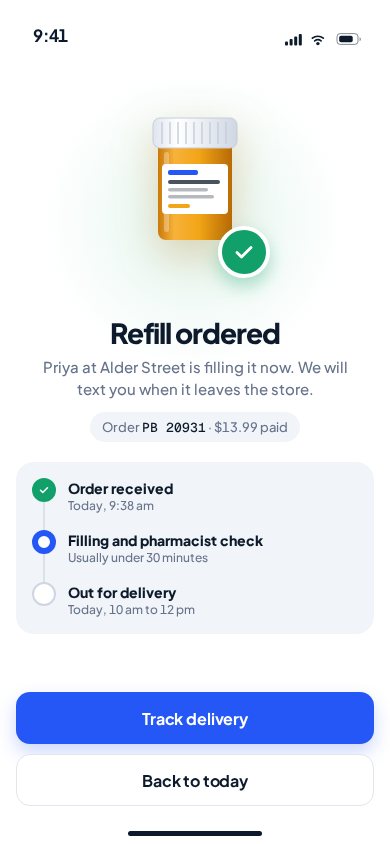
A success screen from Pillbox, a pharmacy refills and medicine reminders app template in a Clinical style. Screen 17 of 25.
Pillbox is a complete pharmacy and medicine app: welcome, sign in and a text code, a today timeline of doses to take or skip, a dose sheet, a weekly pillbox grid, a medicine cabinet, a medicine page with its label and supply, adding a medicine by scanning the label, a dose schedule, an interaction check, refills ready to order, pickup or delivery, choosing a store on a map, order review, a placed order, live delivery tracking, a pickup code, a chat with the pharmacist, an adherence report, notifications, a Plus plan, a family profile and settings. Cool grey and white with cobalt, amber and a calm green for taken.
| Detail | Value |
|---|---|
| Screen type | Success |
| App | Pillbox: Pharmacy refills and medicine reminders |
| Category | Health and fitness |
| Design language | Clinical, light |
| Type | Plus Jakarta Sans |
| Colours | #f1f4f8 background, #ffffff surface, #0c1a2b text, #66738a text-muted, #2457f5 accent, #ffffff accent-contrast, #f2a516 secondary, #e1e6ee border, #e5484d danger |
What this screen says
- Refill ordered
- Priya at Alder Street is filling it now. We will text you when it leaves the store.
- Order PB 20931 · $13.99 paid
- Order received
- Today, 9:38 am
- Filling and pharmacist check
- Usually under 30 minutes
- Out for delivery
- Today, 10 am to 12 pm
- Track delivery
- Back to today
Around it in Pillbox
More success and confirmation screens
- Cradle Logged: Baby tracker
- Medly Visit booked: Doctor on call
- Donor Booked: Blood donation, counted drop by drop
- Unfold Flow complete: Yoga and stretching
- Kilo Workout done: Strength training log
- Cyra Logged: Cycle tracker
- Harbor Checked in: Therapy and mood
- Fasten Fast complete: Intermittent fasting
- Plate Logged: Calorie and macro tracker
- Vita Booked: Personal health record
- Forge Workout done: AI fitness and nutrition
- Lull All set: Sleep sounds and meditation
Every fitness app success screen
What makes a good confirmation screen
- Confirm in the headline. "Payment sent", "Table booked for Friday at 8" or "Lesson complete" in plain words, with a clear success colour or icon.
- Repeat the key details. Amount, date, reference number or score, so people do not need to check elsewhere that the right thing happened.
- Say what happens next. When the order arrives, when the money lands, when the next lesson unlocks.
- Offer the next step. Track the order, add to calendar, share, or start the next lesson. One primary action and a way back home.
The full confirmation screen guide and every example
Remix Pillbox free: describe your own app and it is drawn in this design. Or get its files from $10: Figma, React Native, SwiftUI, Flutter and HTML.