Templates · Detail screens · Fitness app · Fasten
Fasten Fat burning screen
A detail screen from Fasten, an intermittent fasting app template in a Dark-first style. Screen 9 of 25.
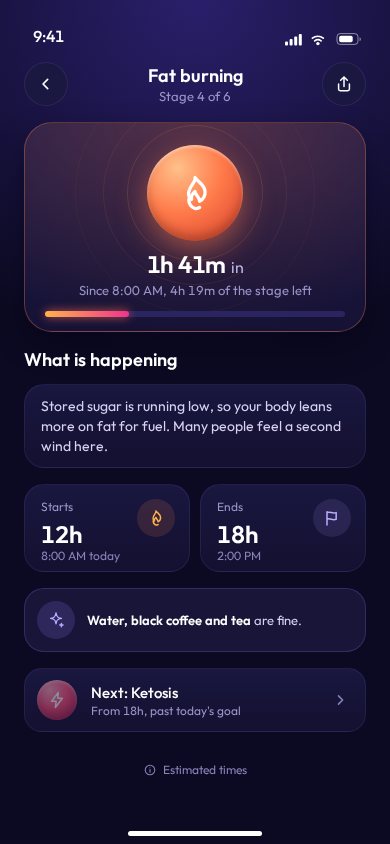
Fasten is a complete intermittent fasting app: welcome, sign in, a code, a goal and an eating window, a home built around a glowing timer ring, the stages of the fast on a timeline, ending a fast and its summary, fasting plans, a meal log, water, a weight trend, history on a calendar, insights, notifications, a Plus plan, profile and settings. One orange to magenta gradient marks the fast itself: the ring, the stage you are in and every main button.
| Detail | Value |
|---|---|
| Screen type | Detail |
| App | Fasten: Intermittent fasting |
| Category | Health and fitness |
| Design language | Dark-first, dark |
| Type | Outfit |
| Colours | #0c0a22 background, #17143a surface, #ffffff text, #9a95c9 text-muted, #ff8a4c accent, #25082b accent-contrast, #f0338f secondary, #2a2658 border, #ff5d73 danger |
What this screen says
- Fat burning
- Stage 4 of 6
- 1h 41m in
- Since 8:00 AM, 4h 19m of the stage left
- What is happening
- Stored sugar is running low, so your body leans more on fat for fuel. Many people feel a second wind here.
- Starts
- 12h
- 8:00 AM today
- Ends
- 18h
- 2:00 PM
- Water, black coffee and tea are fine.
- Next: Ketosis
- From 18h, past today's goal
- Estimated times
Around it in Fasten
More detail screens
- Forge Workout: AI fitness and nutrition
- Lull Course: Sleep sounds and meditation
- Pace Workout: Fitness tracker
- Flexpass Studio: One membership, many studios
- Clinic Doctor: Find and book doctors
- Careline Task: Care for an ageing parent
- Velo Class: Live and on-demand indoor cycling
- Vantage Sleep: Sports watch companion
- Labwork Panel: Book blood tests and see results
- Segment Activity: Runs and rides with friends
- Nightly Readiness: Smart ring sleep and readiness
- Pillbox Dose: Pharmacy refills and medicine reminders
Every fitness app detail screen
What makes a good detail screen
- Lead with what identifies the item. A large image or title, the price or status, and the key facts at the top. People should know they are in the right place at a glance.
- Keep the main action visible. A sticky bottom button for Add to cart, Book or Play stays reachable while people scroll through details.
- Order information by importance. The facts that decide the choice come first; reviews, specifications and fine print further down.
- Use progressive disclosure. Long descriptions, specifications and policies can expand on tap rather than filling the screen.
The full detail screen guide and every example
Remix Fasten free: describe your own app and it is drawn in this design. Or get its files from $10: Figma, React Native, SwiftUI, Flutter and HTML.