Templates · Booking and checkout screens · Travel app · Fare
Fare options screen
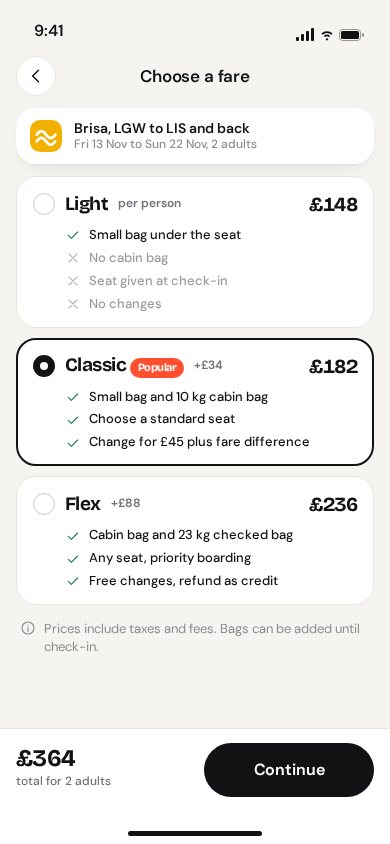
A checkout screen from Fare, a flight search and price alerts app template in a Minimal style. Screen 10 of 25.
Fare is a complete flight search app: welcome, home airport, sign in, a search home with a dotted route arc, airport search, a fare calendar, results, filters, a flight itinerary, fare options, passengers, seat map, review and pay, booked, trips, a boarding pass, live flight status, price history with a forecast, price alerts and a new alert, explore by price, notifications, a premium plan, profile and settings. Warm paper and white with ink black and a single flare orange.
| Detail | Value |
|---|---|
| Screen type | Checkout |
| App | Fare: Flight search and price alerts |
| Category | Travel |
| Design language | Minimal, light |
| Type | Bricolage Grotesque for headings, DM Sans for text |
| Colours | #f5f4f0 background, #ffffff surface, #111214 text, #6f7177 text-muted, #ff4f2e accent, #ffffff accent-contrast, #111214 secondary, #e8e6df border, #12804a success |
What this screen says
- Choose a fare
- Brisa, LGW to LIS and backFri 13 Nov to Sun 22 Nov, 2 adults
- Lightper person£148
- Small bag under the seat
- No cabin bag
- Seat given at check-in
- No changes
- ClassicPopular +£34£182
- Small bag and 10 kg cabin bag
- Choose a standard seat
- Change for £45 plus fare difference
- Flex+£88£236
- Cabin bag and 23 kg checked bag
- Any seat, priority boarding
- Free changes, refund as credit
- Prices include taxes and fees. Bags can be added until check-in.
- £364total for 2 adults
- Continue
Around it in Fare
More booking and checkout screens
- Scoot Checkout: E-scooter and e-bike rental
- Nomad Checkout: Travel eSIM data plans
- Tern Checkout: Ferry and island hopping
- Berth Choose berth: Night trains and sleeper cabins
- Caravan Dates: Campervan rental and road trips
- Layover Book lounge: Airport guide, gates and lounges
- Permit Review and pay: Visas and travel documents wallet
- Backroad Book stay: Road trip planner with stops
- Bunk Checkout: Hostels and backpacker meetups
- Piazza Get tour: Self-guided city walking tours
- Fjord Book excursion: Cruise companion on board
- Kerb Duration: Parking that reads like a road sign
Every travel app checkout screen
What makes a good checkout screen
- Show the total early and honestly. Taxes, delivery and service fees should appear before the last step. A higher total on the final screen feels like a trick.
- Offer wallet payments. Apple Pay and Google Pay skip card typing entirely. Show them first when they are available.
- Ask for the minimum. Only the fields needed to deliver or book. Save details for next time.
- Let people review before paying. A clear summary of items, dates, address and price, with each part editable without starting over.
The full checkout screen guide and every example
Remix Fare free: describe your own app and it is drawn in this design. Or get its files from $10: Figma, React Native, SwiftUI, Flutter and HTML.