Templates · Booking and checkout screens · Travel app · Permit
Permit Review and pay screen
A checkout screen from Permit, a visas and travel documents wallet app template in a Clinical style. Screen 13 of 25.
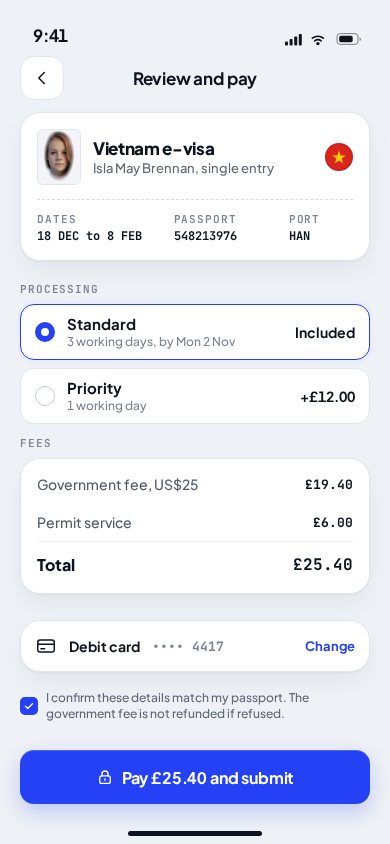
Permit is a complete travel documents wallet: welcome, sign in, a passport scan, a wallet of passports, visas and cards, the passport data page, every document, a trip with entry readiness per country, an entry requirements check and the rules for one country, a travel authorisation, an e-visa application with a compliant photo, review and pay and a submitted screen, live application status, a 90 in 180 day stay counter, a validity timeline, add a document, a secure share link, border mode, family passports, alerts, a Plus plan, profile and settings. Paper grey and white with cobalt, navy and quiet status colours.
| Detail | Value |
|---|---|
| Screen type | Checkout |
| App | Permit: Visas and travel documents wallet |
| Category | Travel |
| Design language | Clinical, light |
| Type | JetBrains Mono for headings, Plus Jakarta Sans for text |
| Colours | #eef1f5 background, #ffffff surface, #0d1420 text, #5d6778 text-muted, #2541f5 accent, #ffffff accent-contrast, #14213d secondary, #e1e6ee border, #c42a30 danger, #0b7a55 success, #9a5a00 warning |
What this screen says
- Review and pay
- Vietnam e-visa
- Isla May Brennan, single entry
- Dates
- 18 DEC to 8 FEB
- Passport
- Port
- HAN
- Processing
- Standard
- 3 working days, by Mon 2 Nov
- Included
- Priority
- 1 working day
- Fees
- Government fee, US$25£19.40
- Permit service£6.00
- Total£25.40
- Debit card•••• 4417 Change
- I confirm these details match my passport. The government fee is not refunded if refused.
- Pay £25.40 and submit
Around it in Permit
More booking and checkout screens
- Contrail Payment: Airline booking, check-in and boarding
- Keycard Review booking: Hotel stays, digital key and room service
- Detour Plan drive: Community driving navigation
- Convoy Book seat: Carpooling between cities
- Manifest Rebook: Trip plans from your confirmation emails
- Roadster Pick a slot: Your electric car, from your phone
- Fairground Pick dates: Theme park tickets, wait times and map
- Scoot Checkout: E-scooter and e-bike rental
- Nomad Checkout: Travel eSIM data plans
- Tern Checkout: Ferry and island hopping
- Berth Choose berth: Night trains and sleeper cabins
- Caravan Dates: Campervan rental and road trips
Every travel app checkout screen
What makes a good checkout screen
- Show the total early and honestly. Taxes, delivery and service fees should appear before the last step. A higher total on the final screen feels like a trick.
- Offer wallet payments. Apple Pay and Google Pay skip card typing entirely. Show them first when they are available.
- Ask for the minimum. Only the fields needed to deliver or book. Save details for next time.
- Let people review before paying. A clear summary of items, dates, address and price, with each part editable without starting over.
The full checkout screen guide and every example
Remix Permit free: describe your own app and it is drawn in this design. Or get its files from $10: Figma, React Native, SwiftUI, Flutter and HTML.