Templates · Booking and checkout screens · Travel app · Fjord
Fjord Book excursion screen
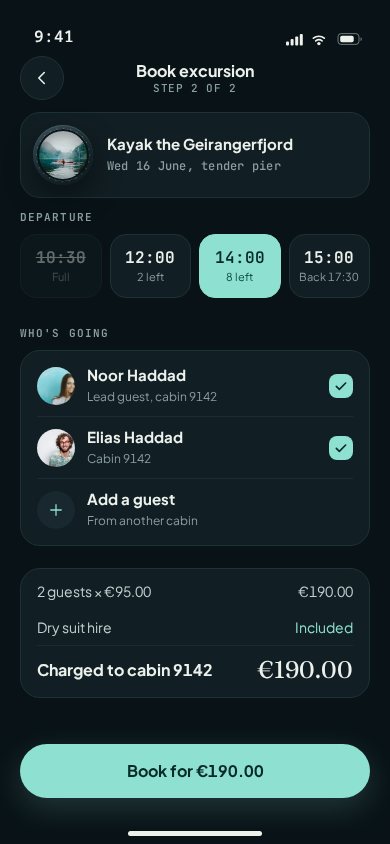
A checkout screen from Fjord, a cruise companion on board app template in a Dark-first style. Screen 9 of 25.
Fjord is a complete cruise companion: welcome, sign in with a booking reference, the safety drill, a today screen with the port, all aboard time and the day's plan, the itinerary on a nautical chart, port days, shore excursions with booking and a confirmation, a day planner, dining with a table reservation, a deck plan, the live voyage tracker, a bow camera, the onboard account, room service, Wi-Fi plans, the cabin, the cruise card, notifications, profile and settings. Fjord night slate with glacier mint and midnight sun amber.
| Detail | Value |
|---|---|
| Screen type | Checkout |
| App | Fjord: Cruise companion on board |
| Category | Travel |
| Design language | Dark-first, dark |
| Type | Fraunces for headings, Plus Jakarta Sans for text |
| Colours | #091317 background, #111e23 surface, #edf1ec text, #8b9ea3 text-muted, #8ee0d1 accent, #062a26 accent-contrast, #f5b862 secondary, #1f3138 border, #ff7a6b danger |
What this screen says
- Book excursionStep 2 of 2
- Kayak the GeirangerfjordWed 16 June, tender pier
- Departure
- 10:30Full
- 12:002 left
- 14:008 left
- 15:00Back 17:30
- Who's going
- Noor HaddadLead guest, cabin 9142
- Elias HaddadCabin 9142
- Add a guestFrom another cabin
- 2 guests × €95.00 €190.00
- Dry suit hire Included
- Charged to cabin 9142 €190.00
- Book for €190.00
Around it in Fjord
More booking and checkout screens
- Linea Buy a ticket: City transit
- Hollow Dates: Cabin and boutique stays
- Aloft Choose seat: Flight tracker
- Pitch Dates: Campsite booking and trip kit
- Hail Choose a ride: Ride hailing
- Volta Pick a connector: EV charging
- Museo Book tickets: Museum guide
- Roamly Dates and guests: Trips, stays and experiences
- Jaunt Checkout: Bus, train and flight booking
- Spoke Reserve: Bike sharing
- Navara Booking: Yacht charter
- Voya Seats: Travel booking
Every travel app checkout screen
What makes a good checkout screen
- Show the total early and honestly. Taxes, delivery and service fees should appear before the last step. A higher total on the final screen feels like a trick.
- Offer wallet payments. Apple Pay and Google Pay skip card typing entirely. Show them first when they are available.
- Ask for the minimum. Only the fields needed to deliver or book. Save details for next time.
- Let people review before paying. A clear summary of items, dates, address and price, with each part editable without starting over.
The full checkout screen guide and every example
Remix Fjord free: describe your own app and it is drawn in this design. Or get its files from $10: Figma, React Native, SwiftUI, Flutter and HTML.