Templates · Form and input screens · Travel app · Fare
Fare Passengers screen
A form screen from Fare, a flight search and price alerts app template in a Minimal style. Screen 11 of 25.
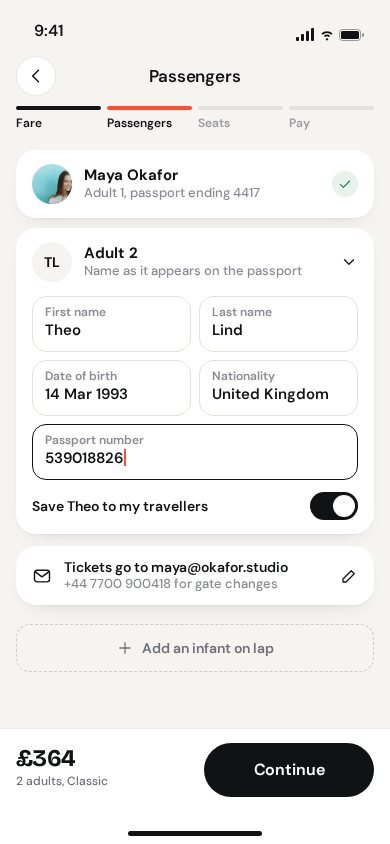
Fare is a complete flight search app: welcome, home airport, sign in, a search home with a dotted route arc, airport search, a fare calendar, results, filters, a flight itinerary, fare options, passengers, seat map, review and pay, booked, trips, a boarding pass, live flight status, price history with a forecast, price alerts and a new alert, explore by price, notifications, a premium plan, profile and settings. Warm paper and white with ink black and a single flare orange.
| Detail | Value |
|---|---|
| Screen type | Form |
| App | Fare: Flight search and price alerts |
| Category | Travel |
| Design language | Minimal, light |
| Type | Bricolage Grotesque for headings, DM Sans for text |
| Colours | #f5f4f0 background, #ffffff surface, #111214 text, #6f7177 text-muted, #ff4f2e accent, #ffffff accent-contrast, #111214 secondary, #e8e6df border, #12804a success |
What this screen says
- Passengers
- Fare Passengers Seats Pay
- Maya OkaforAdult 1, passport ending 4417
- TL
- Adult 2Name as it appears on the passport
- First nameTheo
- Last nameLind
- Date of birth14 Mar 1993
- NationalityUnited Kingdom
- Passport number539018826
- Save Theo to my travellers
- Tickets go to maya@okafor.studio+44 7700 900418 for gate changes
- Add an infant on lap
- £3642 adults, Classic
- Continue
Around it in Fare
More form and input screens
- Manifest Add plan: Trip plans from your confirmation emails
- Roadster Charge schedule: Your electric car, from your phone
- Fairground Virtual queue: Theme park tickets, wait times and map
- Scoot Wallet: E-scooter and e-bike rental
- Nomad Turn on data: Travel eSIM data plans
- Tern Seats: Ferry and island hopping
- Berth Extras: Night trains and sleeper cabins
- Caravan Pickup: Campervan rental and road trips
- Layover Add flight: Airport guide, gates and lounges
- Permit Apply for e-visa: Visas and travel documents wallet
- Backroad Add stop: Road trip planner with stops
- Bunk Host a meetup: Hostels and backpacker meetups
What makes a good form screen
- Ask only what you need. Every field is a reason to stop. Remove optional fields or move them to later.
- Labels above fields. Visible labels stay readable while people type; placeholder-only labels disappear.
- Use the right keyboard and input. Number pads for amounts, email keyboards for email, pickers for dates and autofill for addresses and codes.
- Validate as people go. Show problems next to the field when people leave it, in words that say how to fix them.
The full form screen guide and every example
Remix Fare free: describe your own app and it is drawn in this design. Or get its files from $10: Figma, React Native, SwiftUI, Flutter and HTML.