Templates · Home screens · Travel app · Rove
Rove Home screen
A home screen from Rove, a reviews and things to do app template in a Playful style. Screen 4 of 25.
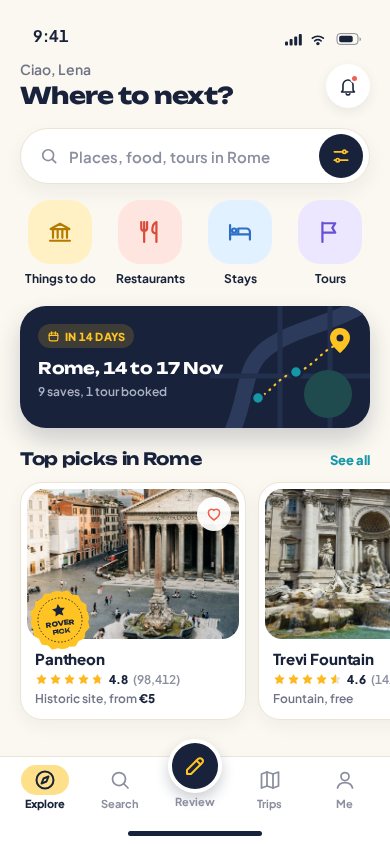
Rove is a complete travel reviews app: welcome, travel style, sign in, a home with search and a trip card, search, things to do with filters, a map with rating pins, an attraction page, traveller photos, review scores and a full review, writing a review, restaurants and a restaurant page, a small group tour, date and time picking, checkout and a booked ticket, trips and a day by day itinerary, contribution stats, notifications, a Plus plan, profile and settings. Paper and white with deep ink navy, marigold stars and lagoon teal.
| Detail | Value |
|---|---|
| Screen type | Home |
| App | Rove: Reviews and things to do |
| Category | Travel |
| Design language | Playful, light |
| Type | Unbounded for headings, Plus Jakarta Sans for text |
| Colours | #fbf8f1 background, #ffffff surface, #18223a text, #6f7487 text-muted, #ffc423 accent, #18223a accent-contrast, #1597a8 secondary, #ece5d6 border, #f0604f danger |
What this screen says
- Ciao, Lena
- Where to next?
- Places, food, tours in Rome
- Things to do
- Restaurants
- Stays
- Tours
- IN 14 DAYS
- Rome, 14 to 17 Nov
- 9 saves, 1 tour booked
- Top picks in Rome
- See all
- Pantheon
- 4.8(98,412)
- Historic site, from €5
- Trevi Fountain
- 4.6(141,203)
- Fountain, free
- Explore
- Search
- Review
- Trips
- Me
Around it in Rove
More home screens
- Spoke Home: Bike sharing
- Navara Home: Yacht charter
- Voya Home: Travel booking
- Wheelhouse Home: Driver app for ride hailing
- Fuelup Home: Pay at the pump and car wash
- Omnia Home: Super app for rides, food and payments
- Staya Explore: Homes and stays from local hosts
- Lodge Home: Hotels, deals and reservations
- Fare Home: Flight search and price alerts
- Ignition Explore: Car rental from local hosts
- Contrail Home: Airline booking, check-in and boarding
- Keycard Home: Hotel stays, digital key and room service
What makes a good home screen
- Put the most important thing first. Decide the one thing most people come for, like today's workout, a balance or the next booking, and give it the top of the screen.
- Make it feel current. Greetings with the time of day, today's date, fresh numbers and recent activity tell people the app is alive and about them.
- Keep quick actions within thumb reach. The two or three things people do most should be one tap away, in the lower part of the screen or a floating button.
- Group related content in clear sections. Use headings and spacing so the screen scans as a few blocks, not a long mixed list.
The full home screen guide and every example
Remix Rove free: describe your own app and it is drawn in this design. Or get its files from $10: Figma, React Native, SwiftUI, Flutter and HTML.