Templates · Detail screens · Education app · Epoch
Epoch Era screen
A detail screen from Epoch, a history on a timeline app template in a Brutalist style. Screen 6 of 25.
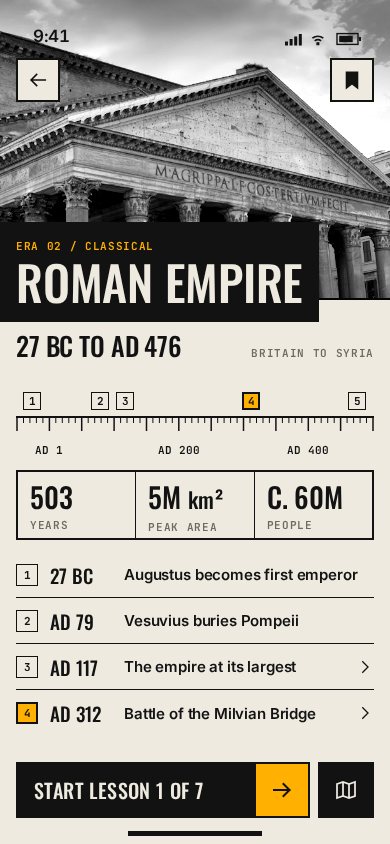
Epoch is a complete history app built around one long timeline: welcome, era picking, sign in, an on this day home, a zoomable timeline of five eras, an era page, an event, a historical figure, search, a reading lesson, an audio episode, a dot matrix atlas with a year scrubber, a meanwhile view of parallel civilisations, a quiz and its score, saved items, a personal timeline with an add event form, progress stats, notifications, a Pro plan with checkout and confirmation, profile and settings. Limestone and ink with signal amber.
| Detail | Value |
|---|---|
| Screen type | Detail |
| App | Epoch: History on a timeline |
| Category | Education |
| Design language | Brutalist, light |
| Type | Oswald for headings, Inter for text |
| Colours | #eeeae0 background, #f7f4ec surface, #121212 text, #6e6a60 text-muted, #ffb000 accent, #121212 accent-contrast, #121212 secondary, #121212 border, #e0402a danger |
What this screen says
- Era 02 / Classical
- Roman Empire
- 27 BC to AD 476Britain to Syria
- 503Years
- 5M km²Peak area
- c. 60MPeople
- 127 BC
- Augustus becomes first emperor
- 2AD 79
- Vesuvius buries Pompeii
- 3AD 117
- The empire at its largest
- 4AD 312
- Battle of the Milvian Bridge
- Start lesson 1 of 7
Around it in Epoch
More detail screens
- Tuckin Story: Bedtime stories for kids
- Zenith Saturn: Night sky guide
- Chalk Course: Design courses
- Encore Course: Creator courses
- Classroom Stream: Class stream and assignments
- Studyhall Course: Free lessons and practice for school
- Tutor profile: Book online tutors for any skill
- Leaf Dictionary: E-books and reading
- Almanac Article: The free encyclopedia reader
- Tiles How to play: Daily word and number puzzles
- Stacks Title: Borrow e-books and audiobooks from your library
- Penpal Chat: Language exchange chat
Every education app detail screen
What makes a good detail screen
- Lead with what identifies the item. A large image or title, the price or status, and the key facts at the top. People should know they are in the right place at a glance.
- Keep the main action visible. A sticky bottom button for Add to cart, Book or Play stays reachable while people scroll through details.
- Order information by importance. The facts that decide the choice come first; reviews, specifications and fine print further down.
- Use progressive disclosure. Long descriptions, specifications and policies can expand on tap rather than filling the screen.
The full detail screen guide and every example
Remix Epoch free: describe your own app and it is drawn in this design. Or get its files from $10: Figma, React Native, SwiftUI, Flutter and HTML.