Templates · Search and explore screens · Education app · Quad
Quad Course search screen
A search screen from Quad, a university campus app template in an Enterprise style. Screen 13 of 25.
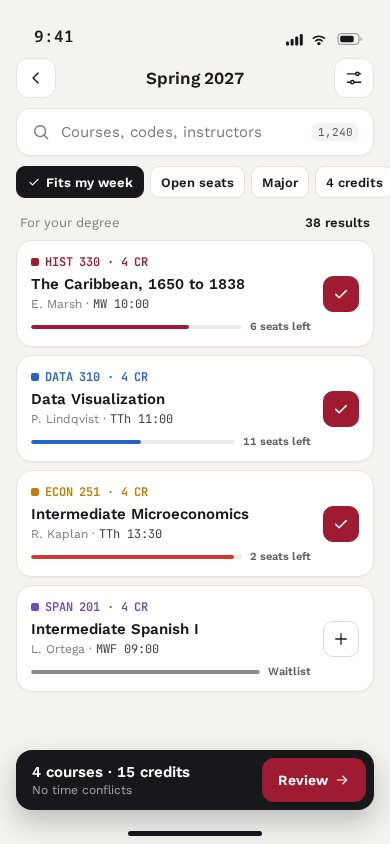
Quad is a complete campus app for a student at Calder University: welcome, sign in with a Calder ID and a code check, a Today home with the next class, a week timetable, class and course pages, a recorded lecture with chapters, assignments, a file submission with a receipt, grades with a GPA trend, next term's course search, enrollment and confirmation, a campus map, the library with live busyness, study room booking, a live shuttle, dining, meal plans, a digital campus ID, notifications, profile and settings. Stone and white with collegiate crimson, gold and four course colours.
| Detail | Value |
|---|---|
| Screen type | Search |
| App | Quad: University campus app |
| Category | Education |
| Design language | Enterprise, light |
| Type | Instrument Serif for headings, Work Sans for text |
| Colours | #f4f3ef background, #ffffff surface, #17181c text, #7a7c84 text-muted, #9e1b32 accent, #ffffff accent-contrast, #f2b731 secondary, #e6e3dc border, #d2382f danger |
What this screen says
- Spring 2027
- Courses, codes, instructors
- Fits my week
- Open seats
- Major
- 4 credits
- For your degree 38 results
- HIST 330 · 4 CR
- The Caribbean, 1650 to 1838
- E. Marsh · MW 10:00
- 6 seats left
- DATA 310 · 4 CR
- Data Visualization
- P. Lindqvist · TTh 11:00
- 11 seats left
- ECON 251 · 4 CR
- Intermediate Microeconomics
- R. Kaplan · TTh 13:30
- 2 seats left
- SPAN 201 · 4 CR
- Intermediate Spanish I
- L. Ortega · MWF 09:00
- Waitlist
- 4 courses · 15 creditsNo time conflicts
- Review
Around it in Quad
More search and explore screens
- Stacks Browse: Borrow e-books and audiobooks from your library
- Penpal Search: Language exchange chat
- Lexis Search: A word a day
- Quanta Explore: Interactive physics lessons
- Cram Search: Exam prep and mock tests
- Palm Dictionary: Learn sign language
- Epoch Timeline: History on a timeline
- Wren Library: Early reading for kids
- Proof Topics: Maths tutor that shows its working
- Skim Discover: Speed reading trainer
- Terra Explore: Geography and flags quiz
- Gambit Openings: Chess training
Every education app search screen
What makes a good search screen
- Show something before people type. Recent searches, popular items or categories make the empty search screen useful and save typing.
- Suggest as people type. Autocomplete with matching items, not only matching words, lets people jump straight to a result.
- Make filters visible and reversible. Show active filters as chips that can be removed in one tap, and the number of results as filters change.
- Forgive typos. Close matches and "Did you mean" stop a spelling mistake from ending in an empty screen.
The full search screen guide and every example
Remix Quad free: describe your own app and it is drawn in this design. Or get its files from $10: Figma, React Native, SwiftUI, Flutter and HTML.