Templates · Form and input screens · Smart home app · Dusk
Dusk New schedule screen
A form screen from Dusk, a smart home scenarios app template in a Glass style. Screen 13 of 25.
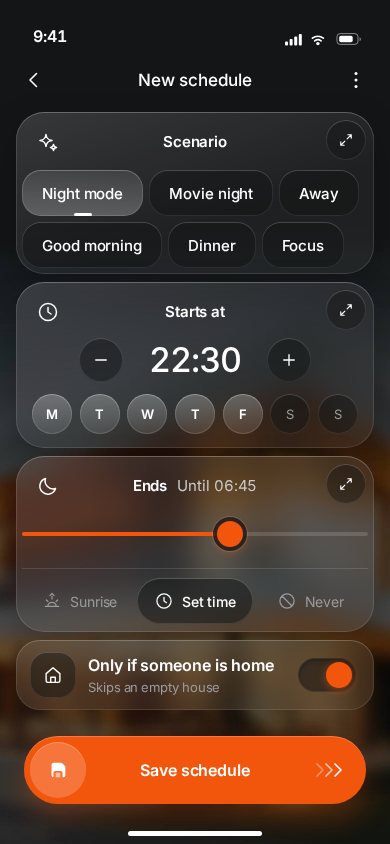
Dusk is a complete smart home app where scenarios do the work: night mode, movie night and away set rooms, devices, climate and security together in one tap. It covers onboarding, sign in, a home with a scenario carousel, a scenario builder, rooms, lights, climate, pairing a device, security and cameras, schedules, energy, a Plus plan, household, profile and settings.
| Detail | Value |
|---|---|
| Screen type | Form |
| App | Dusk: Smart home scenarios |
| Category | Smart home |
| Design language | Glass, dark |
| Type | Inter |
| Colours | #141516 background, #26272a surface, #ffffff text, #9a9b9e text-muted, #f2560d accent, #ffffff accent-contrast, #3ad07c secondary, #3a3b3e border, #ff5a4f danger |
What this screen says
- New schedule
- Scenario
- Night mode
- Movie night
- Away
- Good morning
- Dinner
- Focus
- Starts at
- MTWTFSS
- EndsUntil 06:45
- Sunrise
- Set time
- Never
- Only if someone is home
- Skips an empty house
- Save schedule
Around it in Dusk
More form and input screens
- Tagged Your policy: Home inventory for insurance
- Lobby New guest pass: Apartment building app
- Sweep Edit map: Robot vacuum and mop
- Lumen Add device: Smart home energy
- Abode Set a time: Smart home devices
- Boxed Move details: Book movers and plan moving day
- Meter Confirm reading: Your energy supplier account
- Couch Keyboard: TV remote, casting and watchlist
- Chime New routine: Voice assistant and smart speaker
- Latch New key: Smart locks and guest access
- Mesh Schedule: Home Wi-Fi network
- Decibel Group rooms: Multi-room speakers
Every smart home app form screen
What makes a good form screen
- Ask only what you need. Every field is a reason to stop. Remove optional fields or move them to later.
- Labels above fields. Visible labels stay readable while people type; placeholder-only labels disappear.
- Use the right keyboard and input. Number pads for amounts, email keyboards for email, pickers for dates and autofill for addresses and codes.
- Validate as people go. Show problems next to the field when people leave it, in words that say how to fix them.
The full form screen guide and every example
Remix Dusk free: describe your own app and it is drawn in this design. Or get its files from $10: Figma, React Native, SwiftUI, Flutter and HTML.