Templates · Success and confirmation screens · Social app · Duo
Duo Date booked screen
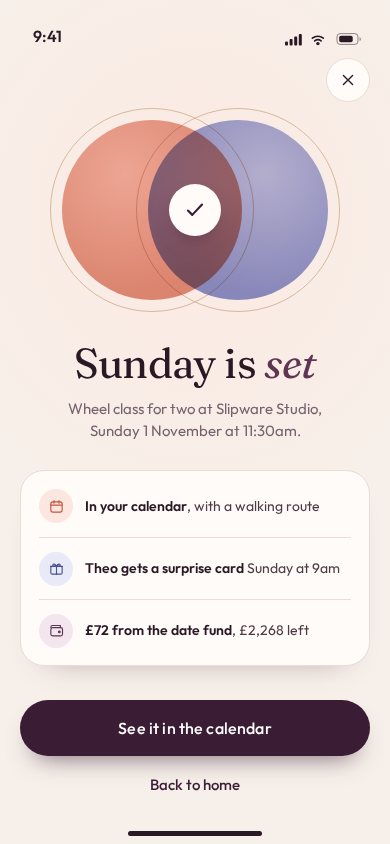
A success screen from Duo, a social app template in a Luxury style. Screen 12 of 25.
Duo is a complete app for two: welcome, pairing with an invite code and sign in, a home with your days together, today's question and both moods, the question and both answers, a shared calendar that finds when you are both free, date ideas you both matched, an idea, planning a date, booking a table and the confirmation, live meet up tracking, memories and a single memory, an animated year recap, a love note, insights, milestones, a bucket list, a shared date fund, a membership plan, notifications, your couple profile and settings. Porcelain, aubergine, rosé and dusk.
| Detail | Value |
|---|---|
| Screen type | Success |
| App | Duo: An app for two |
| Category | Social |
| Design language | Luxury, light |
| Type | Fraunces for headings, Outfit for text |
| Colours | #f7f0ea background, #fffbf8 surface, #2a1825 text, #8c7682 text-muted, #3a1c34 accent, #ffffff accent-contrast, #e08f7b secondary, #ecdcd2 border, #c4553f danger |
What this screen says
- Sunday is set
- Wheel class for two at Slipware Studio, Sunday 1 November at 11:30am.
- In your calendar, with a walking route
- Theo gets a surprise card Sunday at 9am
- £72 from the date fund, £2,268 left
- See it in the calendar
- Back to home
Around it in Duo
More success and confirmation screens
- Facet Link ready: Video calls with family and friends
- Stoop Claimed: Neighbourhood noticeboard
- Aura Dropped: Moods with close friends
- Kindly Booked: Volunteering near you
- Cohort Intro sent: Alumni and mentor network
- Kin Book ordered: Private family circle
- Confetti RSVP sent: Party invites and RSVPs
- Ripple Posted: Voice notes social
- Soapbox On the box: Weekly debates and polls
- Ballot Vote cast: Settle it on paper
- Murmur Welcome to Plus: Chat rooms for art lovers
- Wink Match: Video first dating
Every social app success screen
What makes a good confirmation screen
- Confirm in the headline. "Payment sent", "Table booked for Friday at 8" or "Lesson complete" in plain words, with a clear success colour or icon.
- Repeat the key details. Amount, date, reference number or score, so people do not need to check elsewhere that the right thing happened.
- Say what happens next. When the order arrives, when the money lands, when the next lesson unlocks.
- Offer the next step. Track the order, add to calendar, share, or start the next lesson. One primary action and a way back home.
The full confirmation screen guide and every example
Remix Duo free: describe your own app and it is drawn in this design. Or get its files from $10: Figma, React Native, SwiftUI, Flutter and HTML.