Templates · Success and confirmation screens · Social app · Ballot
Ballot Vote cast screen
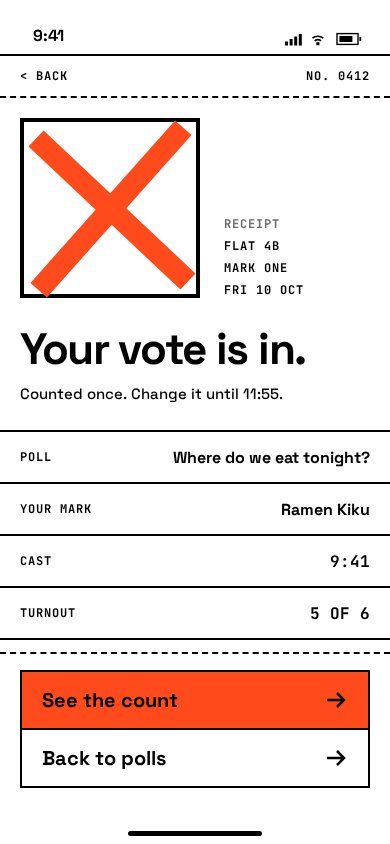
A success screen from Ballot, a settle it on paper app template in a Brutalist style. Screen 7 of 25.
Ballot is ballot settles where to eat and when to meet. It covers making a poll with options and a closing time, inviting voters, marking one box or ranking choices, live results with huge percentages, ranked count rounds, groups, an archive of closed polls, stats, notifications and a Ballot Plus plan.
| Detail | Value |
|---|---|
| Screen type | Success |
| App | Ballot: Settle it on paper |
| Category | Social |
| Design language | Brutalist, light |
| Type | Space Grotesk |
| Colours | #ffffff background, #ffffff surface, #000000 text, #6b6b6b text-muted, #ff4a1c accent, #000000 accent-contrast, #000000 border |
What this screen says
- < BACK NO. 0412
- RECEIPTFLAT 4B MARK ONE FRI 10 OCT
- Your vote is in.
- Counted once. Change it until 11:55.
- POLL Where do we eat tonight?
- YOUR MARK Ramen Kiku
- CAST 9:41
- TURNOUT 5 OF 6
- See the count
- Back to polls
Around it in Ballot
More success and confirmation screens
- Flick Posted: Short video feed
- Squawk You are Plus: Short posts and live conversation
- Agora Posted: Communities, threads and votes
- Spark Match: Swipe dating
- Candid Posted: One real photo a day
- Blink Sent: Camera chat and stories
- Cipher Verified: Encrypted private messenger
- Commons Going: Friends, groups and events
- Tether Help sent: Family location and safety
- Facet Link ready: Video calls with family and friends
- Stoop Claimed: Neighbourhood noticeboard
- Aura Dropped: Moods with close friends
Every social app success screen
What makes a good confirmation screen
- Confirm in the headline. "Payment sent", "Table booked for Friday at 8" or "Lesson complete" in plain words, with a clear success colour or icon.
- Repeat the key details. Amount, date, reference number or score, so people do not need to check elsewhere that the right thing happened.
- Say what happens next. When the order arrives, when the money lands, when the next lesson unlocks.
- Offer the next step. Track the order, add to calendar, share, or start the next lesson. One primary action and a way back home.
The full confirmation screen guide and every example
Remix Ballot free: describe your own app and it is drawn in this design. Or get its files from $10: Figma, React Native, SwiftUI, Flutter and HTML.