Templates · Success and confirmation screens · Social app · Cohort
Cohort Intro sent screen
A success screen from Cohort, an alumni and mentor network app template in an Enterprise style. Screen 8 of 25.
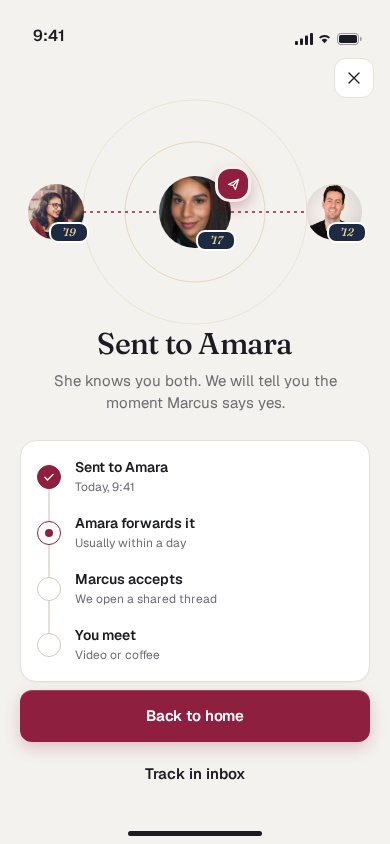
Cohort is a complete alumni network: welcome, school sign in, claiming your alumni record, a home with your class and suggested people, a searchable directory, alumni profiles with the warmest intro path, a request intro flow, mentor matching with booking and a live video session, inbox and chat, reunions and events with tickets, an alumni referral job board, a network dashboard, a paid plan, notifications, profile and settings. Parchment and white with claret, Oxford navy and a touch of old gold.
| Detail | Value |
|---|---|
| Screen type | Success |
| App | Cohort: Alumni and mentor network |
| Category | Social |
| Design language | Enterprise, light |
| Type | Fraunces for headings, Geist for text |
| Colours | #f4f2ee background, #ffffff surface, #1a1b23 text, #6e6b75 text-muted, #8e1f3f accent, #f6e7ec accent-tint, #1d2a44 secondary, #c9a24c highlight, #e6e1d8 border, #2f7d5b success |
What this screen says
- ’19
- ’17
- ’12
- Sent to Amara
- She knows you both. We will tell you the moment Marcus says yes.
- Sent to AmaraToday, 9:41
- Amara forwards itUsually within a day
- Marcus acceptsWe open a shared thread
- You meetVideo or coffee
- Back to home
- Track in inbox
Around it in Cohort
More success and confirmation screens
- Snoot Playdate set: Social app for pets
- Huddle You are going: Interest groups and meetups
- Glade Posted: Photo and clip social network
- Onair Stream ended: Live streaming
- Drift Room ended: Reels and voice rooms
- Glitz Top up complete: Party live streaming
- Hearth Circle ready: Messenger for trips and circles
- Chirp Upgraded: Messenger with file sharing
- Banter Live ended: Live messenger
- Natter Community ready: Minimal messenger
- Nearly Match: Dating by crossed paths
- Linkup Applied: Professional network and jobs
Every social app success screen
What makes a good confirmation screen
- Confirm in the headline. "Payment sent", "Table booked for Friday at 8" or "Lesson complete" in plain words, with a clear success colour or icon.
- Repeat the key details. Amount, date, reference number or score, so people do not need to check elsewhere that the right thing happened.
- Say what happens next. When the order arrives, when the money lands, when the next lesson unlocks.
- Offer the next step. Track the order, add to calendar, share, or start the next lesson. One primary action and a way back home.
The full confirmation screen guide and every example
Remix Cohort free: describe your own app and it is drawn in this design. Or get its files from $10: Figma, React Native, SwiftUI, Flutter and HTML.