Templates · Success and confirmation screens · Social app · Stoop
Stoop Claimed screen
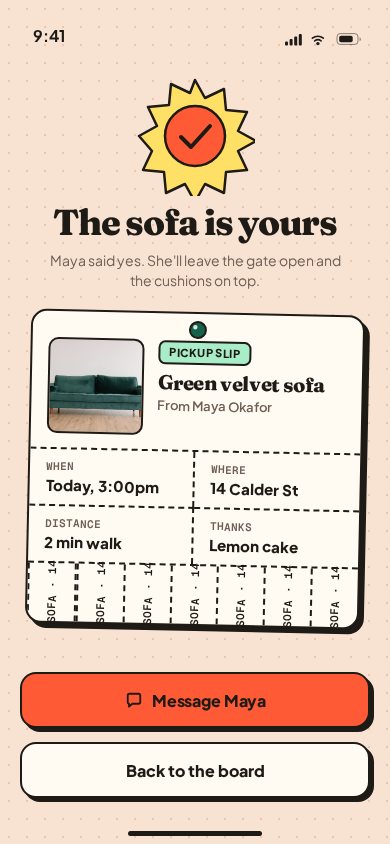
A success screen from Stoop, a neighbourhood noticeboard app template in a Neubrutalism style. Screen 12 of 25.
Stoop is a complete neighbourhood noticeboard: welcome, find your block, sign in and a postcard address check, a cork board home of pinned flyers, search, a block map, a lost cat poster, free stuff with a claim and pickup flow, a new post composer, events with a block party and an RSVP, a shared tool shed, inbox and chat, neighbour profiles, block pulse stats, notifications, a patron plan, profile and settings. Blush brick, ink outlines, pushpin red, canary and door green.
| Detail | Value |
|---|---|
| Screen type | Success |
| App | Stoop: Neighbourhood noticeboard |
| Category | Social |
| Design language | Neubrutalism, light |
| Type | Fraunces for headings, Plus Jakarta Sans for text |
| Colours | #f8e3d3 background, #fffaf2 surface, #1e1a16 text, #6e5f55 text-muted, #ff5a36 accent, #1e1a16 accent-contrast, #14624a secondary, #1e1a16 border, #a9edc8 success, #ffe066 warning, #e8432a danger |
What this screen says
- The sofa is yours
- Maya said yes. She'll leave the gate open and the cushions on top.
- Pickup slip
- Green velvet sofa
- From Maya Okafor
- WHENToday, 3:00pm
- WHERE14 Calder St
- DISTANCE2 min walk
- THANKSLemon cake
- SOFA · 14SOFA · 14SOFA · 14SOFA · 14SOFA · 14SOFA · 14SOFA · 14
- Message Maya
- Back to the board
Around it in Stoop
More success and confirmation screens
- Parrot Payment sent: Private messaging, groups and calls
- Carrier Post scheduled: Cloud messaging with channels
- Vista Shared: Photos, stories and reels
- Flick Posted: Short video feed
- Squawk You are Plus: Short posts and live conversation
- Agora Posted: Communities, threads and votes
- Spark Match: Swipe dating
- Candid Posted: One real photo a day
- Blink Sent: Camera chat and stories
- Cipher Verified: Encrypted private messenger
- Commons Going: Friends, groups and events
- Tether Help sent: Family location and safety
Every social app success screen
What makes a good confirmation screen
- Confirm in the headline. "Payment sent", "Table booked for Friday at 8" or "Lesson complete" in plain words, with a clear success colour or icon.
- Repeat the key details. Amount, date, reference number or score, so people do not need to check elsewhere that the right thing happened.
- Say what happens next. When the order arrives, when the money lands, when the next lesson unlocks.
- Offer the next step. Track the order, add to calendar, share, or start the next lesson. One primary action and a way back home.
The full confirmation screen guide and every example
Remix Stoop free: describe your own app and it is drawn in this design. Or get its files from $10: Figma, React Native, SwiftUI, Flutter and HTML.