Templates · Home screens · Social app · Cohort
Cohort Home screen
A home screen from Cohort, an alumni and mentor network app template in an Enterprise style. Screen 4 of 25.
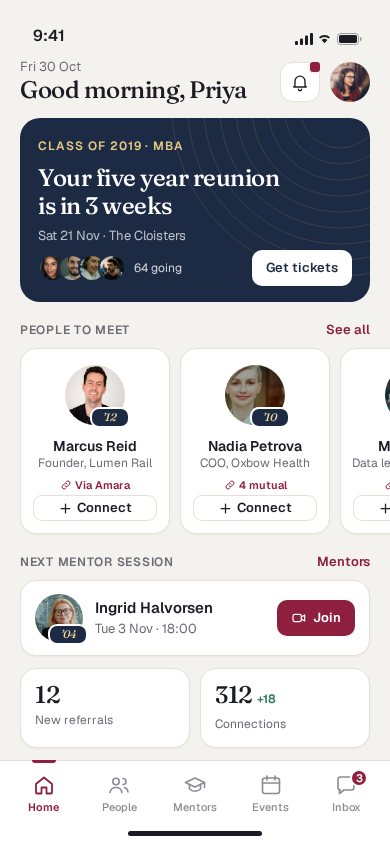
Cohort is a complete alumni network: welcome, school sign in, claiming your alumni record, a home with your class and suggested people, a searchable directory, alumni profiles with the warmest intro path, a request intro flow, mentor matching with booking and a live video session, inbox and chat, reunions and events with tickets, an alumni referral job board, a network dashboard, a paid plan, notifications, profile and settings. Parchment and white with claret, Oxford navy and a touch of old gold.
| Detail | Value |
|---|---|
| Screen type | Home |
| App | Cohort: Alumni and mentor network |
| Category | Social |
| Design language | Enterprise, light |
| Type | Fraunces for headings, Geist for text |
| Colours | #f4f2ee background, #ffffff surface, #1a1b23 text, #6e6b75 text-muted, #8e1f3f accent, #f6e7ec accent-tint, #1d2a44 secondary, #c9a24c highlight, #e6e1d8 border, #2f7d5b success |
What this screen says
- Fri 30 Oct
- Good morning, Priya
- Class of 2019 · MBA
- Your five year reunion is in 3 weeks
- Sat 21 Nov · The Cloisters
- 64 going
- Get tickets
- People to meetSee all
- ’12
- Marcus ReidFounder, Lumen Rail Via Amara
- Connect
- ’10
- Nadia PetrovaCOO, Oxbow Health 4 mutual
- ’18
- Mei TanakaData lead, Brightwater 6 mutual
- Next mentor sessionMentors
- ’04
- Ingrid HalvorsenTue 3 Nov · 18:00
- Join
- 12New referrals
- 312+18Connections
- Home
- People
- Mentors
- Events
- Inbox 3
Around it in Cohort
More home screens
- Civic Home: Report issues and city services
- Guild Home: Community servers with voice and text chat
- Parrot Chats: Private messaging, groups and calls
- Carrier Chats: Cloud messaging with channels
- Vista Home: Photos, stories and reels
- Flick For you: Short video feed
- Squawk Home: Short posts and live conversation
- Agora Home: Communities, threads and votes
- Spark Discover: Swipe dating
- Candid Locked feed: One real photo a day
- Blink Camera: Camera chat and stories
- Cipher Chats: Encrypted private messenger
What makes a good home screen
- Put the most important thing first. Decide the one thing most people come for, like today's workout, a balance or the next booking, and give it the top of the screen.
- Make it feel current. Greetings with the time of day, today's date, fresh numbers and recent activity tell people the app is alive and about them.
- Keep quick actions within thumb reach. The two or three things people do most should be one tap away, in the lower part of the screen or a floating button.
- Group related content in clear sections. Use headings and spacing so the screen scans as a few blocks, not a long mixed list.
The full home screen guide and every example
Remix Cohort free: describe your own app and it is drawn in this design. Or get its files from $10: Figma, React Native, SwiftUI, Flutter and HTML.