Templates · Home screens · Social app · Confetti
Confetti Home screen
A home screen from Confetti, a party invites and RSVPs app template in a Glass style. Screen 3 of 25.
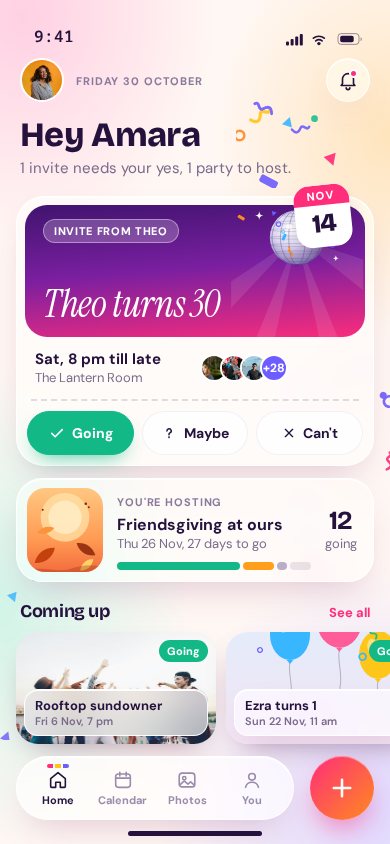
Confetti is a complete party app: welcome, sign in, a home with the invite waiting on you, the invite itself with a tear-off RSVP stub, an RSVP form and a confirmation, a gift list, then the host side: a new party, a gallery of invite designs, the invite editor, adding guests, review and send, invites sent, the party page, the guest list, an RSVP tracker, a potluck, the party chat and live arrivals on a map. Plus a calendar, a shared photo wall, notifications, a Plus plan, profile and settings. Sherbet glass with hot pink, tangerine and confetti in six colours.
| Detail | Value |
|---|---|
| Screen type | Home |
| App | Confetti: Party invites and RSVPs |
| Category | Social |
| Design language | Glass, light |
| Type | Bricolage Grotesque for headings, DM Sans for text |
| Colours | #fff7f3 background, #ffffff surface, #24123d text, #7a6b8c text-muted, #ff2d7a accent, #ffffff accent-contrast, #6d5cff secondary, #12b886 success, #ff9f1c warning, #ead9e6 border |
What this screen says
- Friday 30 October
- Hey Amara
- 1 invite needs your yes, 1 party to host.
- Invite from Theo
- Theo turns 30
- NOV14
- Sat, 8 pm till lateThe Lantern Room
- Going
- Maybe
- Can't
- You're hosting Friendsgiving at oursThu 26 Nov, 27 days to go
- 12going
- Coming up
- See all
- Rooftop sundownerFri 6 Nov, 7 pm
- Ezra turns 1Sun 22 Nov, 11 am
- Home
- Calendar
- Photos
- You
Around it in Confetti
More home screens
- Quorum Home: Questions and expert answers
- Backer Home: Support creators with memberships
- Pledge Discover: Back creative projects
- Civic Home: Report issues and city services
- Guild Home: Community servers with voice and text chat
- Parrot Chats: Private messaging, groups and calls
- Carrier Chats: Cloud messaging with channels
- Vista Home: Photos, stories and reels
- Flick For you: Short video feed
- Squawk Home: Short posts and live conversation
- Agora Home: Communities, threads and votes
- Spark Discover: Swipe dating
What makes a good home screen
- Put the most important thing first. Decide the one thing most people come for, like today's workout, a balance or the next booking, and give it the top of the screen.
- Make it feel current. Greetings with the time of day, today's date, fresh numbers and recent activity tell people the app is alive and about them.
- Keep quick actions within thumb reach. The two or three things people do most should be one tap away, in the lower part of the screen or a floating button.
- Group related content in clear sections. Use headings and spacing so the screen scans as a few blocks, not a long mixed list.
The full home screen guide and every example
Remix Confetti free: describe your own app and it is drawn in this design. Or get its files from $10: Figma, React Native, SwiftUI, Flutter and HTML.