Templates · Onboarding screens · Productivity app · Docket
Docket Workspace screen
An onboarding screen from Docket, a task and sprint planner app template in a Dark-first style. Screen 4 of 25.
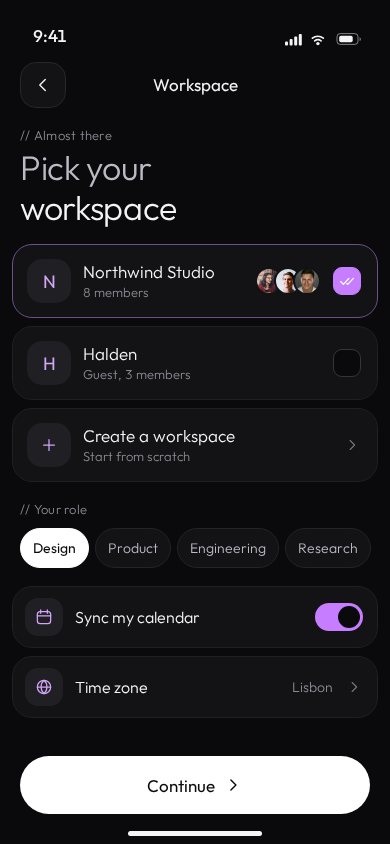
Docket is a complete team planner: welcome, sign in, a home with task progress and today's tasks, task lists and details, a sprint with checkbox rows, a board, a calendar, meetings with a timeline strip and a call screen, an AI helper that plans the day, a focus timer, progress stats, the team, a Pro plan, profile and settings. Near-black with one orchid purple, a lime dot, hatched bars and white sheets with lilac cards.
| Detail | Value |
|---|---|
| Screen type | Onboarding |
| App | Docket: Task and sprint planner |
| Category | Productivity |
| Design language | Dark-first, dark |
| Type | Outfit |
| Colours | #0a0a0c background, #17171a surface, #f5f3f8 text, #8b8a94 text-muted, #c77dff accent, #0a0a0c accent-contrast, #d6f24b secondary, #2a2a30 border, #ff7a7a danger |
What this screen says
- Workspace
- // Almost there
- Pick your
- Northwind Studio8 members
- HaldenGuest, 3 members
- Create a workspaceStart from scratch
- // Your role
- Design Product Engineering Research
- Sync my calendar
- Time zone
- Lisbon
- Continue
Around it in Docket
More onboarding screens
- Tandem Welcome: Team chat, channels and huddles
- Shipyard Welcome: Issue tracking for product teams
- Canvas Welcome: Design files and comments on mobile
- Merge Welcome: Code, pull requests and reviews
- Query Welcome: AI answers with sources
- Glossa Welcome: Translate text, voice and camera
- Layout Welcome: Design anything from templates
- Tick Welcome: To-do lists and reminders
- Beacon Welcome: Find your devices and people
- Staffroom Welcome: HR, payslips and time off
- Slot Welcome: Booking links and meeting scheduling
- Sheet Welcome: Spreadsheets and databases
Every productivity app onboarding screen
What makes a good onboarding screen
- One idea per screen. Each screen should say one thing in a headline people can read in a second. If a screen needs a paragraph, it is doing too much.
- Personalise with a purpose. Ask a question only if the answer changes what people see next, like a goal, a level or an interest. Then show that the answer mattered.
- Explain permissions before asking. Show your own screen saying why you need notifications, location or the camera before the system prompt. People who understand the reason are more likely to allow it.
- Let people skip. A visible skip or "I'll do this later" respects returning users and the impatient. Make sure skipping still lands them somewhere useful.
The full onboarding screen guide and every example
Remix Docket free: describe your own app and it is drawn in this design. Or get its files from $10: Figma, React Native, SwiftUI, Flutter and HTML.