Templates · Onboarding screens · Productivity app · Dispatch
Dispatch Welcome screen
An onboarding screen from Dispatch, a field service jobs for technicians app template in an Enterprise style. Screen 1 of 25.
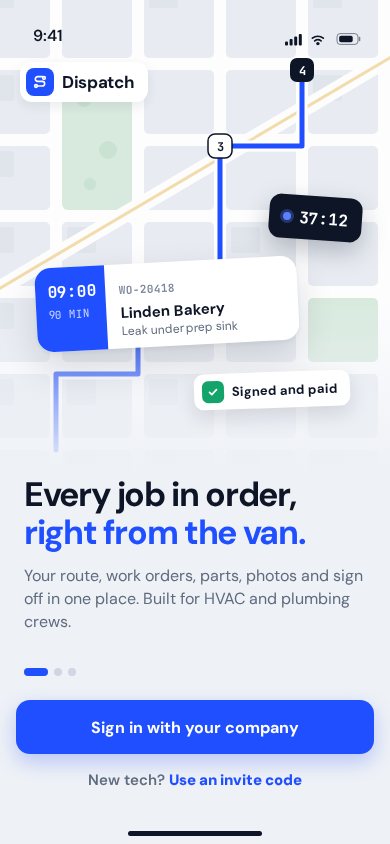
Dispatch is a complete field service app for technicians: welcome and company sign in, a today screen with the day's route spine, jobs, search, a work order ticket, the customer and their equipment, live navigation to the next stop, an on site job clock, a checklist, photo capture with markup, van stock, an invoice, customer sign off and a closed job. Then the week schedule, dispatch messages, performance, a timesheet, follow up jobs, notifications, a team plan, profile and settings. Cool grey, white tickets, deep ink and cobalt.
| Detail | Value |
|---|---|
| Screen type | Onboarding |
| App | Dispatch: Field service jobs for technicians |
| Category | Productivity |
| Design language | Enterprise, light |
| Type | DM Sans |
| Colours | #eef1f6 background, #ffffff surface, #0d1526 text, #5f6b7f text-muted, #1f4fff accent, #ffffff accent-contrast, #12a46b secondary, #dde2ea border, #e5484d danger |
What this screen says
- Dispatch
- 09:0090 MIN
- WO-20418
- Linden Bakery
- Leak under prep sink
- Signed and paid
- Every job in order, right from the van.
- Your route, work orders, parts, photos and sign off in one place. Built for HVAC and plumbing crews.
- Sign in with your company
- New tech? Use an invite code
Around it in Dispatch
More onboarding screens
- Convene Welcome: Video meetings
- Unplug Welcome: Screen time blocker
- Streak Welcome: Small days, long chains
- Deskly Welcome: Hybrid office booking
- Pomo Welcome: Focus timer
- Postbox Welcome: Email for busy teams
- Daybook Welcome: Calendar and planner
- Scanly Welcome: Document scanner
- Keyring Welcome: Password manager
- Rota Welcome: Shift scheduling for hourly teams
- Inkwell Welcome: Daily journal
- Shortlist Welcome: Job search and application tracker
Every productivity app onboarding screen
What makes a good onboarding screen
- One idea per screen. Each screen should say one thing in a headline people can read in a second. If a screen needs a paragraph, it is doing too much.
- Personalise with a purpose. Ask a question only if the answer changes what people see next, like a goal, a level or an interest. Then show that the answer mattered.
- Explain permissions before asking. Show your own screen saying why you need notifications, location or the camera before the system prompt. People who understand the reason are more likely to allow it.
- Let people skip. A visible skip or "I'll do this later" respects returning users and the impatient. Make sure skipping still lands them somewhere useful.
The full onboarding screen guide and every example
Remix Dispatch free: describe your own app and it is drawn in this design. Or get its files from $10: Figma, React Native, SwiftUI, Flutter and HTML.