Templates · Settings screens · Travel app · Detour
Detour Settings screen
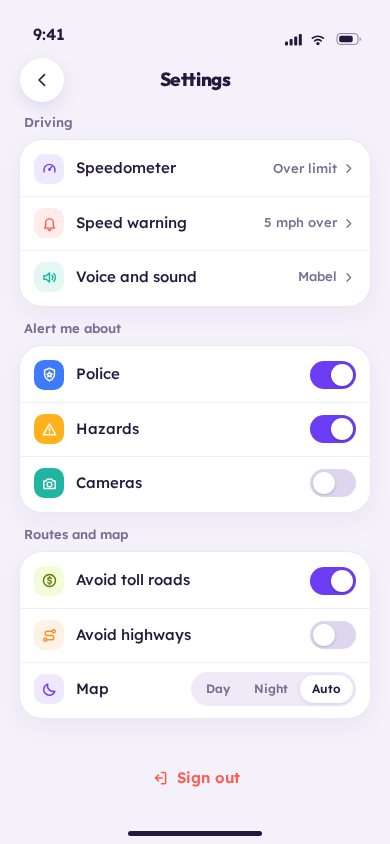
A settings screen from Detour, a community driving navigation app template in a Playful style. Screen 25 of 25.
Detour is a complete community driving app: welcome, home and work setup, sign in, a live map with driver reports, search with categories, fuel prices and a station page, route options, a tilted turn by turn drive with a police alert, a report sheet, a hazard report and its thank you, arrival, sharing your ETA, planned drives with a leave by chart, driving stats, driver levels, an inbox, profile, car icons, voices, a Plus plan and settings. Lavender, grape and lime with a bright sticker colour for every kind of report.
| Detail | Value |
|---|---|
| Screen type | Settings |
| App | Detour: Community driving navigation |
| Category | Travel |
| Design language | Playful, light |
| Type | Outfit for headings, Lexend for text |
| Colours | #f4f1fa background, #ffffff surface, #221a3d text, #776f92 text-muted, #6b3df5 accent, #ffffff accent-contrast, #c8f53c secondary, #e7e1f4 border, #ff5a4e danger |
What this screen says
- Settings
- Driving
- Speedometer Over limit
- Speed warning 5 mph over
- Voice and sound Mabel
- Alert me about
- Police
- Hazards
- Cameras
- Routes and map
- Avoid toll roads
- Avoid highways
- Map DayNightAuto
- Sign out
Around it in Detour
More settings screens
- Permit Settings: Visas and travel documents wallet
- Backroad Settings: Road trip planner with stops
- Bunk Settings: Hostels and backpacker meetups
- Piazza Settings: Self-guided city walking tours
- Fjord Settings: Cruise companion on board
- Atlas Route options: Maps and navigation
- Kerb Settings: Parking that reads like a road sign
- Linea Settings: City transit
- Hollow Settings: Cabin and boutique stays
- Aloft Settings: Flight tracker
- Pitch Settings: Campsite booking and trip kit
- Hail Settings: Ride hailing
Every travel app settings screen
What makes a good settings screen
- Group options into clear sections. Account, notifications, privacy, appearance and help, with headings, so people scan to the right group.
- Label settings by their effect. "Daily reminder at 8:00" is clearer than "Reminders". Add a short description under options that need one.
- Use the right control. Toggles for on and off, a row that opens a list for choices, and sliders only for ranges.
- Apply changes immediately. Most mobile settings take effect when changed, with no Save button to forget.
The full settings screen guide and every example
Remix Detour free: describe your own app and it is drawn in this design. Or get its files from $10: Figma, React Native, SwiftUI, Flutter and HTML.