Templates · Sign in and sign up screens · Food app · Corked
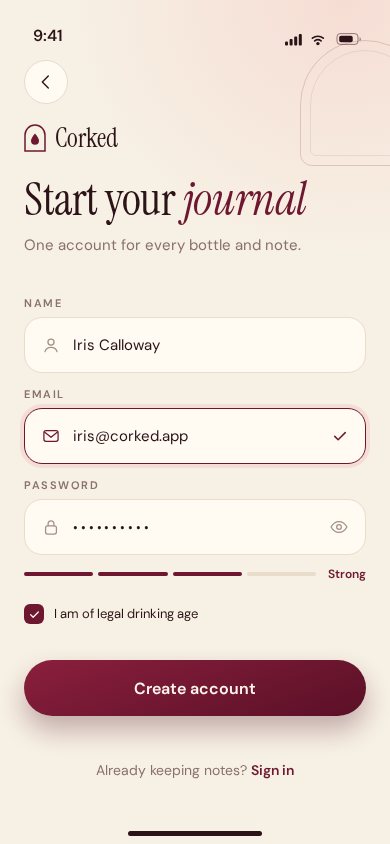
Corked Create account screen
A sign in screen from Corked, a wine journal and cellar app template in a Luxury style. Screen 4 of 25.
Corked is a complete wine journal: welcome, a palate quiz, sign in, a home with tonight's pour, scanning a label and its match, the bottle page, a tasting note with an aroma wheel, the journal, a cellar with a rack view, adding a bottle, food pairings, a wishlist, a shop with cart and delivery tracking, yearly stats, a Reserve membership, notifications, profile and settings. Every bottle and label is drawn for the template.
| Detail | Value |
|---|---|
| Screen type | Sign in |
| App | Corked: Wine journal and cellar |
| Category | Food |
| Design language | Luxury, light |
| Type | DM Sans |
| Colours | #f7f0e4 background, #fffaf2 surface, #2b1318 text, #8a7269 text-muted, #6d1730 accent, #fff6ec accent-contrast, #f0d3cb secondary, #e8dccb border, #b8431f danger |
What this screen says
- Corked
- Start your journal
- One account for every bottle and note.
- Name
- Iris Calloway
- iris@corked.app
- Password
- ••••••••••
- Strong
- I am of legal drinking age
- Create account
- Already keeping notes? Sign in
Around it in Corked
More sign in and sign up screens
- Forage Sign in: Farmers market and veg box
- Ember Sign in: Smoker and grill thermometer
- Steep Sign in: Tea brewing and tasting notes
- Brigade Sign in: Restaurant kitchen and line ops
- Nibs Sign in: Food allergy and label scanner
- Ladle Sign in: Recipes and meal planning
- Pantry Sign in: Grocery delivery
- Brewly Sign in: Coffee ordering and loyalty
- Tabla Sign in: Tables worth dressing for
- Crumb Sign in: Neighbourhood bakery
- Tiffin Sign in: Food delivery
- Courier Sign in: Food delivery driver app
What makes a good login screen
- Offer the fastest option first. Sign in with Apple, Google or a passkey takes one tap. If you support them, put them above the email form. Apple asks apps that use a third-party login like Google to also offer an equivalent privacy-focused option, such as Sign in with Apple.
- Separate sign in from sign up clearly. Use different headings and buttons, and a clear link to switch. People who already have an account should never end up creating a second one by accident.
- Use the right keyboard and autofill. Email fields should open the email keyboard and support password managers and one-time code autofill. Small details, big difference in how many people get through.
- Write errors that help. "That password doesn't match this email" is better than "Error 401". Keep what people typed so they only fix the part that was wrong.
The full login screen guide and every example
Remix Corked free: describe your own app and it is drawn in this design. Or get its files from $10: Figma, React Native, SwiftUI, Flutter and HTML.