Templates · List and feed screens · Finance app · Compound
Compound SIPs screen
A list screen from Compound, a mutual funds and SIPs app template in a Minimal style. Screen 18 of 25.
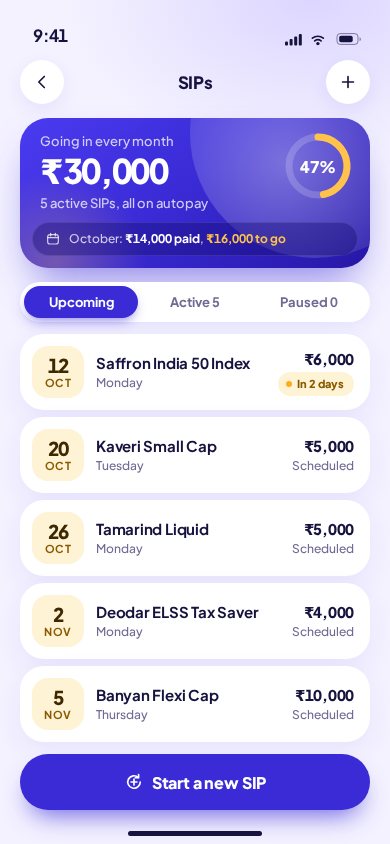
Compound is a complete mutual fund app for Indian investors: welcome, mobile sign in with OTP, KYC, a home with the portfolio value and XIRR, fund discovery, lists and fund pages with returns and a risk meter, holdings, compare, a SIP calculator, starting a SIP with an autopay mandate, one time investments, an order confirmation, investments, SIPs, goals, portfolio analysis, tax, transactions, profile and settings. Lavender white with deep indigo, marigold and mint, amounts in rupees with Indian grouping.
| Detail | Value |
|---|---|
| Screen type | List |
| App | Compound: Mutual funds and SIPs |
| Category | Finance |
| Design language | Minimal, light |
| Type | Plus Jakarta Sans |
| Colours | #f4f2ff background, #ffffff surface, #17133f text, #6e6a93 text-muted, #3a2bd6 accent, #ffffff accent-contrast, #ffc24a secondary, #e7e3fb border, #e5484d danger |
What this screen says
- SIPs
- Going in every month
- 5 active SIPs, all on autopay
- October: ₹14,000 paid, ₹16,000 to go
- Upcoming Active 5 Paused 0
- 12OCT
- Saffron India 50 Index
- Monday
- In 2 days
- 20OCT
- Kaveri Small Cap
- Tuesday
- Scheduled
- 26OCT
- Tamarind Liquid
- 2NOV
- Deodar ELSS Tax Saver
- 5NOV
- Banyan Flexi Cap
- Thursday
- Start a new SIP
Around it in Compound
More list and feed screens
- Billfold Transactions: Cards, passes and tickets wallet
- Payly Plans: UPI payments, recharges and bills
- Crest Cards: Credit card bills and rewards
- Storefront Orders: Run your online store
- Bastion Pay and transfer: Everyday banking from a big bank
- Later Payments: Buy now, pay in four
- Standing Report: Credit score and reports
- Accrue Pots: Retirement and pension planner
- Levy Income: Taxes for freelancers
- Bullion Holdings: Gold and silver savings
- Wage Shifts: Get paid as you work
- Keystone Schedule: Mortgage and home loan tracker
What makes a good list screen
- Show what people need to decide. Each row should carry just enough to choose: a title, one or two details and a status. Everything else belongs on the detail screen.
- Keep rows consistent. The same information in the same place on every row lets people scan down a column instead of reading each item.
- Group with headings. Dates, categories or status headings break long lists into chunks people can skip through.
- Make common actions quick. Swipe actions, a checkbox or a heart on the row save opening the item for small tasks.
The full list screen guide and every example
Remix Compound free: describe your own app and it is drawn in this design. Or get its files from $10: Figma, React Native, SwiftUI, Flutter and HTML.