Templates · Detail screens · Finance app · Compound
Compound Investment screen
A detail screen from Compound, a mutual funds and SIPs app template in a Minimal style. Screen 17 of 25.
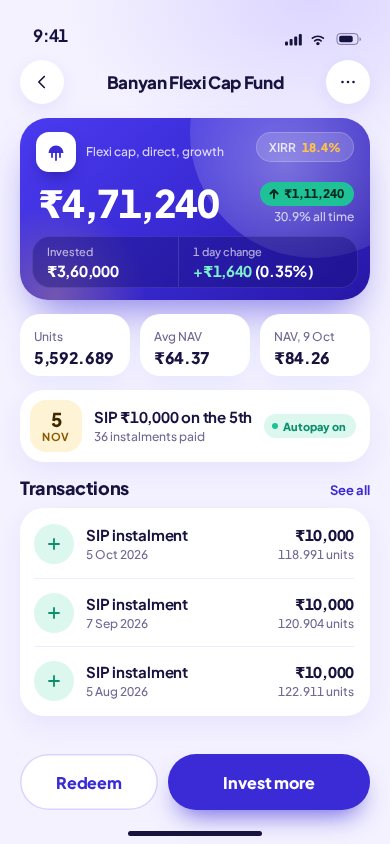
Compound is a complete mutual fund app for Indian investors: welcome, mobile sign in with OTP, KYC, a home with the portfolio value and XIRR, fund discovery, lists and fund pages with returns and a risk meter, holdings, compare, a SIP calculator, starting a SIP with an autopay mandate, one time investments, an order confirmation, investments, SIPs, goals, portfolio analysis, tax, transactions, profile and settings. Lavender white with deep indigo, marigold and mint, amounts in rupees with Indian grouping.
| Detail | Value |
|---|---|
| Screen type | Detail |
| App | Compound: Mutual funds and SIPs |
| Category | Finance |
| Design language | Minimal, light |
| Type | Plus Jakarta Sans |
| Colours | #f4f2ff background, #ffffff surface, #17133f text, #6e6a93 text-muted, #3a2bd6 accent, #ffffff accent-contrast, #ffc24a secondary, #e7e3fb border, #e5484d danger |
What this screen says
- Banyan Flexi Cap Fund
- Flexi cap, direct, growth
- XIRR 18.4%
- ₹1,11,24030.9% all time
- Invested
- 1 day change
- +₹1,640 (0.35%)
- Units
- Avg NAV
- NAV, 9 Oct
- 5NOV
- SIP ₹10,000 on the 5th
- 36 instalments paid
- Autopay on
- Transactions
- See all
- SIP instalment
- 5 Oct 2026
- 118.991 units
- 7 Sep 2026
- 120.904 units
- 5 Aug 2026
- 122.911 units
- Redeem
- Invest more
Around it in Compound
More detail screens
- Wage Shift: Get paid as you work
- Keystone Loan: Mortgage and home loan tracker
- Rebate Card: Cashback card and rewards
- Aegis Auto policy: Insurance policies and claims
- Till Receipt: Card reader and sales for small shops
- Strike Stock: Options trading
- Prism Account: Net worth across every account
- Folio Stock: Stocks and ETF investing
- Halden Account: Premium neobank
- Billable Entry: Time tracking and invoices, kept like a ledger
- Lease Rent: Your tenancy, drawn to plan
- Claim Receipt: Expenses, filed like a till receipt
Every finance app detail screen
What makes a good detail screen
- Lead with what identifies the item. A large image or title, the price or status, and the key facts at the top. People should know they are in the right place at a glance.
- Keep the main action visible. A sticky bottom button for Add to cart, Book or Play stays reachable while people scroll through details.
- Order information by importance. The facts that decide the choice come first; reviews, specifications and fine print further down.
- Use progressive disclosure. Long descriptions, specifications and policies can expand on tap rather than filling the screen.
The full detail screen guide and every example
Remix Compound free: describe your own app and it is drawn in this design. Or get its files from $10: Figma, React Native, SwiftUI, Flutter and HTML.