Templates · Settings screens · Social app · Cipher
Cipher Settings screen
A settings screen from Cipher, an encrypted private messenger app template in a Dark-first style. Screen 25 of 25.
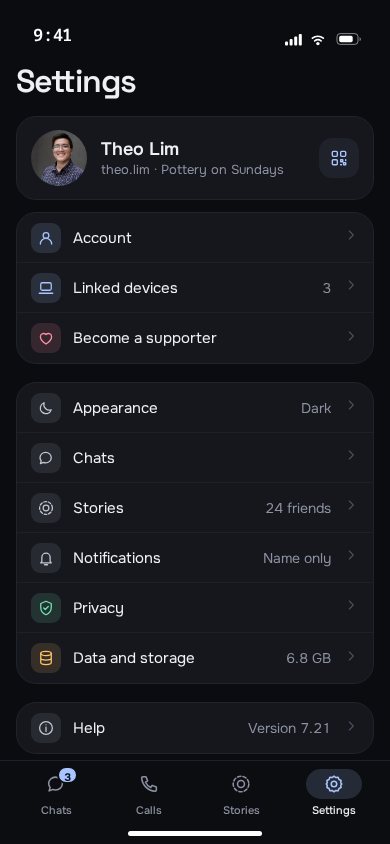
Cipher is a complete private messenger: welcome, phone number and code, a chat list with pinned and sealed chats, a conversation with disappearing messages, safety number verification with a scannable code, contact and group info, a new group, note to self, search, calls with voice and video, stories, linked devices with a pairing scanner, privacy, storage, a supporter plan and settings. Near black and graphite with ice blue bubbles and a mint seal.
| Detail | Value |
|---|---|
| Screen type | Settings |
| App | Cipher: Encrypted private messenger |
| Category | Social |
| Design language | Dark-first, dark |
| Type | Space Grotesk for headings, Onest for text |
| Colours | #0b0c0f background, #15171c surface, #eef0f4 text, #8b91a1 text-muted, #a8c5ff accent, #0a1226 accent-contrast, #74e3b5 secondary, #20232b border, #ff6b6b danger |
What this screen says
- Settings
- Theo Lim
- theo.lim · Pottery on Sundays
- Account
- Linked devices 3
- Become a supporter
- Appearance Dark
- Chats
- Stories 24 friends
- Notifications Name only
- Privacy
- Data and storage 6.8 GB
- Help Version 7.21
- 3Chats
- Calls
- Stories
Around it in Cipher
More settings screens
- Stoop Settings: Neighbourhood noticeboard
- Aura Settings: Moods with close friends
- Kindly Settings: Volunteering near you
- Cohort Settings: Alumni and mentor network
- Kin Settings: Private family circle
- Confetti Settings: Party invites and RSVPs
- Ripple Settings: Voice notes social
- Duo Settings: An app for two
- Soapbox Settings: Weekly debates and polls
- Ballot Settings: Settle it on paper
- Murmur Settings: Chat rooms for art lovers
- Wink Settings: Video first dating
Every social app settings screen
What makes a good settings screen
- Group options into clear sections. Account, notifications, privacy, appearance and help, with headings, so people scan to the right group.
- Label settings by their effect. "Daily reminder at 8:00" is clearer than "Reminders". Add a short description under options that need one.
- Use the right control. Toggles for on and off, a row that opens a list for choices, and sliders only for ranges.
- Apply changes immediately. Most mobile settings take effect when changed, with no Save button to forget.
The full settings screen guide and every example
Remix Cipher free: describe your own app and it is drawn in this design. Or get its files from $10: Figma, React Native, SwiftUI, Flutter and HTML.