Templates · Onboarding screens · Productivity app · Campaign
Campaign Your business screen
An onboarding screen from Campaign, an email marketing campaigns app template in a Playful style. Screen 3 of 25.
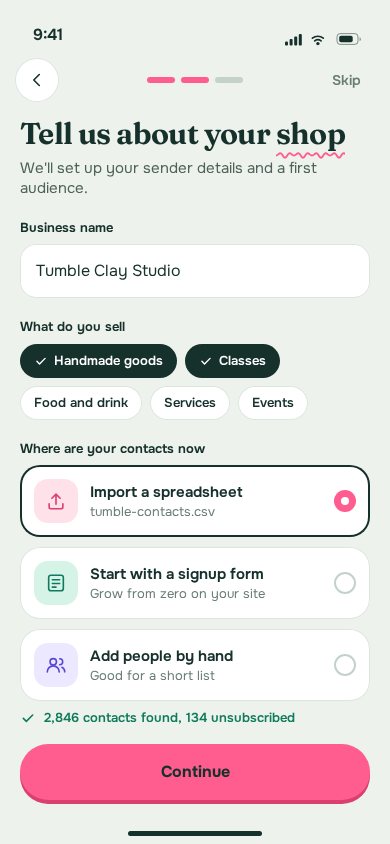
Campaign is a complete email marketing app for a small pottery studio: welcome, sign in and business setup, a home with this week's sends and audience growth, campaigns, a campaign checklist, new campaign, subject line and preview text with an inbox preview, a block email builder with an add block sheet, a phone preview, send test, schedule with a best time to send, review and a scheduled confirmation, a report with opens and clicks, a click map, audience with tags, a segment builder, a contact, an automation journey, a landing page, plans, notifications and settings. Pale sage and white with deep spruce, bubblegum pink, mint and lavender.
| Detail | Value |
|---|---|
| Screen type | Onboarding |
| App | Campaign: Email marketing campaigns |
| Category | Productivity |
| Design language | Playful, light |
| Type | Fraunces for headings, Onest for text |
| Colours | #edf2ec background, #ffffff surface, #16302b text, #6a7d76 text-muted, #ff5d8f accent, #16302b accent-contrast, #23b98f secondary, #dce5de border, #e5484d danger |
What this screen says
- Skip
- Tell us about your shop
- We'll set up your sender details and a first audience.
- Business name
- Tumble Clay Studio
- What do you sell
- Handmade goods Classes Food and drink Services Events
- Where are your contacts now
- Import a spreadsheettumble-contacts.csv
- Start with a signup formGrow from zero on your site
- Add people by handGood for a short list
- 2,846 contacts found, 134 unsubscribed
- Continue
Around it in Campaign
More onboarding screens
- Unplug Welcome: Screen time blocker
- Streak Welcome: Small days, long chains
- Deskly Welcome: Hybrid office booking
- Pomo Welcome: Focus timer
- Postbox Welcome: Email for busy teams
- Daybook Welcome: Calendar and planner
- Scanly Welcome: Document scanner
- Keyring Welcome: Password manager
- Rota Welcome: Shift scheduling for hourly teams
- Inkwell Welcome: Daily journal
- Shortlist Welcome: Job search and application tracker
- Parley Welcome: Team messenger
Every productivity app onboarding screen
What makes a good onboarding screen
- One idea per screen. Each screen should say one thing in a headline people can read in a second. If a screen needs a paragraph, it is doing too much.
- Personalise with a purpose. Ask a question only if the answer changes what people see next, like a goal, a level or an interest. Then show that the answer mattered.
- Explain permissions before asking. Show your own screen saying why you need notifications, location or the camera before the system prompt. People who understand the reason are more likely to allow it.
- Let people skip. A visible skip or "I'll do this later" respects returning users and the impatient. Make sure skipping still lands them somewhere useful.
The full onboarding screen guide and every example
Remix Campaign free: describe your own app and it is drawn in this design. Or get its files from $10: Figma, React Native, SwiftUI, Flutter and HTML.