Templates · Player, camera and editor screens · Productivity app · Campaign
Campaign Preview screen
A media screen from Campaign, an email marketing campaigns app template in a Playful style. Screen 11 of 25.
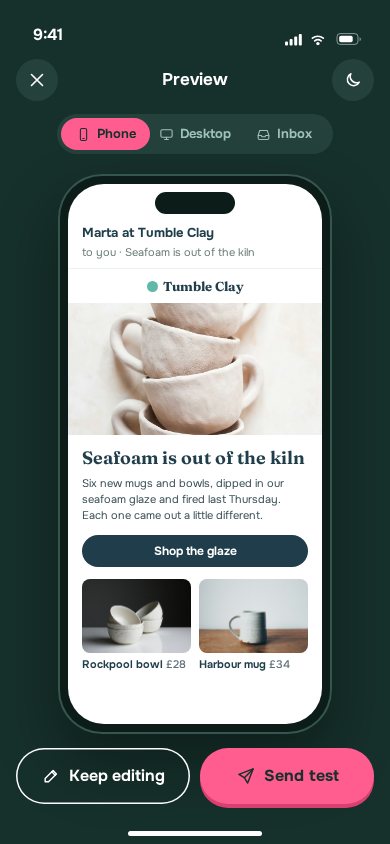
Campaign is a complete email marketing app for a small pottery studio: welcome, sign in and business setup, a home with this week's sends and audience growth, campaigns, a campaign checklist, new campaign, subject line and preview text with an inbox preview, a block email builder with an add block sheet, a phone preview, send test, schedule with a best time to send, review and a scheduled confirmation, a report with opens and clicks, a click map, audience with tags, a segment builder, a contact, an automation journey, a landing page, plans, notifications and settings. Pale sage and white with deep spruce, bubblegum pink, mint and lavender.
| Detail | Value |
|---|---|
| Screen type | Media |
| App | Campaign: Email marketing campaigns |
| Category | Productivity |
| Design language | Playful, light |
| Type | Fraunces for headings, Onest for text |
| Colours | #edf2ec background, #ffffff surface, #16302b text, #6a7d76 text-muted, #ff5d8f accent, #16302b accent-contrast, #23b98f secondary, #dce5de border, #e5484d danger |
What this screen says
- Preview
- Phone Desktop Inbox
- Marta at Tumble Clayto you · Seafoam is out of the kiln
- Tumble Clay
- Seafoam is out of the kiln
- Six new mugs and bowls, dipped in our seafoam glaze and fired last Thursday. Each one came out a little different.
- Shop the glaze
- Rockpool bowl £28
- Harbour mug £34
- Keep editing
- Send test
Around it in Campaign
More player, camera and editor screens
- Stow Photo preview: Cloud storage
- Meridian Reader: Mobile web browser
- Swarm Media: Torrent client
- Convene Preview: Video meetings
- Pomo Sound mix: Focus timer
- Scanly Scan: Document scanner
- Inkwell Add photos: Daily journal
- Shortlist Practice question: Job search and application tracker
- Parley Status: Team messenger
- Docket Call: Task and sprint planner
- Margin Voice note: AI note taking
- Aide Ask Aide: Executive AI assistant
Every productivity app media screen
What makes a good media player screen
- Content takes the space. Artwork, video or the camera view should fill most of the screen.
- Primary controls in the thumb zone. Play and pause, the shutter or the main tool, large and low on the screen.
- Show progress and position. A scrubber with elapsed and remaining time, or the step in a lesson.
- Hide secondary controls until needed. Lyrics, queue, filters and advanced tools can live behind a tap or a swipe.
The full media player screen guide and every example
Remix Campaign free: describe your own app and it is drawn in this design. Or get its files from $10: Figma, React Native, SwiftUI, Flutter and HTML.