Templates · Player, camera and editor screens · Productivity app · Margin
Margin Voice note screen
A media screen from Margin, an AI note taking app template in a Dark-first style. Screen 14 of 25.
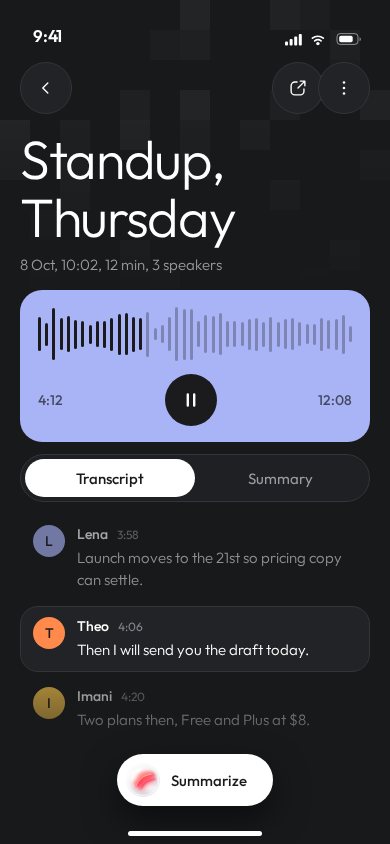
Margin is a complete AI note taking app: onboarding, sign in, a first-run setup, a home wall of colour note cards and photos, search, notebooks, a note with collaborators and a sketch, the note menu, editing, moving a note, voice recording with a transcript, AI summaries, asking your notes and reading the answer, tasks pulled from notes, insights, sharing, notifications, a paid plan, profile and settings. Charcoal dark with huge light headlines, pastel cards and a glossy coral orb for the assistant.
| Detail | Value |
|---|---|
| Screen type | Media |
| App | Margin: AI note taking |
| Category | Productivity |
| Design language | Dark-first, dark |
| Type | Outfit |
| Colours | #18191b background, #222326 surface, #ffffff text, #9b9ca3 text-muted, #ff8a4c accent, #18191b accent-contrast, #a9b4f7 secondary, #34353a border, #f0625f danger |
What this screen says
- Standup,
- Thursday
- 8 Oct, 10:02, 12 min, 3 speakers
- Transcript Summary
- Lena 3:58
- Launch moves to the 21st so pricing copy can settle.
- Theo 4:06
- Then I will send you the draft today.
- Imani 4:20
- Two plans then, Free and Plus at $8.
- Summarize
Around it in Margin
More player, camera and editor screens
- Parley Status: Team messenger
- Docket Call: Task and sprint planner
- Aide Ask Aide: Executive AI assistant
- Juno Voice: AI chat assistant
- Jot Sketch: Quick notes and checklists
- Chrono Focus: World clock, timers and stopwatch
- Frontdesk Call: Customer support inbox
- Campaign Email builder: Email marketing campaigns
- Outpost Crop: Schedule social posts
- Polish Editor: Writing assistant and keyboard
- Tapline Appearance: Link-in-bio pages and analytics
- Quill Meeting notes: Docs, wikis and databases in one workspace
Every productivity app media screen
What makes a good media player screen
- Content takes the space. Artwork, video or the camera view should fill most of the screen.
- Primary controls in the thumb zone. Play and pause, the shutter or the main tool, large and low on the screen.
- Show progress and position. A scrubber with elapsed and remaining time, or the step in a lesson.
- Hide secondary controls until needed. Lyrics, queue, filters and advanced tools can live behind a tap or a swipe.
The full media player screen guide and every example
Remix Margin free: describe your own app and it is drawn in this design. Or get its files from $10: Figma, React Native, SwiftUI, Flutter and HTML.