Templates · Form and input screens · Productivity app · Campaign
Campaign Send test screen
A form screen from Campaign, an email marketing campaigns app template in a Playful style. Screen 12 of 25.
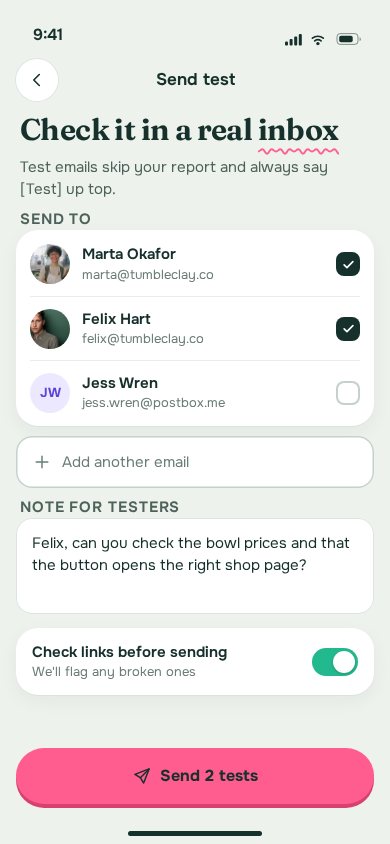
Campaign is a complete email marketing app for a small pottery studio: welcome, sign in and business setup, a home with this week's sends and audience growth, campaigns, a campaign checklist, new campaign, subject line and preview text with an inbox preview, a block email builder with an add block sheet, a phone preview, send test, schedule with a best time to send, review and a scheduled confirmation, a report with opens and clicks, a click map, audience with tags, a segment builder, a contact, an automation journey, a landing page, plans, notifications and settings. Pale sage and white with deep spruce, bubblegum pink, mint and lavender.
| Detail | Value |
|---|---|
| Screen type | Form |
| App | Campaign: Email marketing campaigns |
| Category | Productivity |
| Design language | Playful, light |
| Type | Fraunces for headings, Onest for text |
| Colours | #edf2ec background, #ffffff surface, #16302b text, #6a7d76 text-muted, #ff5d8f accent, #16302b accent-contrast, #23b98f secondary, #dce5de border, #e5484d danger |
What this screen says
- Send test
- Check it in a real inbox
- Test emails skip your report and always say [Test] up top.
- Send to
- Marta Okaformarta@tumbleclay.co
- Felix Hartfelix@tumbleclay.co
- JW
- Jess Wrenjess.wren@postbox.me
- Add another email
- Note for testers
- Felix, can you check the bowl prices and that the button opens the right shop page?
- Check links before sendingWe'll flag any broken ones
- Send 2 tests
Around it in Campaign
More form and input screens
- Tunnel Double hop: VPN and online privacy
- Ping Report issue: Internet speed test
- Glance Price alert: Visual search with the camera
- Replay New recording: Record and share screen videos
- Easel Workspace: Collaborative whiteboard
- Token Add account: Two-factor codes and sign-in approvals
- Beam Pick files: Send big files
- Parchment Text style: Documents, edit and share
- Lectern Format: Slides and presenter remote
- Ringer New contact: Phone, contacts and voicemail
- Pipeline Check in: Sales CRM on the road
- Aim Check in: Goals and key results
Every productivity app form screen
What makes a good form screen
- Ask only what you need. Every field is a reason to stop. Remove optional fields or move them to later.
- Labels above fields. Visible labels stay readable while people type; placeholder-only labels disappear.
- Use the right keyboard and input. Number pads for amounts, email keyboards for email, pickers for dates and autofill for addresses and codes.
- Validate as people go. Show problems next to the field when people leave it, in words that say how to fix them.
The full form screen guide and every example
Remix Campaign free: describe your own app and it is drawn in this design. Or get its files from $10: Figma, React Native, SwiftUI, Flutter and HTML.