Templates · Booking and checkout screens · Finance app · Burrow
Burrow Take money out screen
A checkout screen from Burrow, a shared savings pots app template in a Playful style. Screen 19 of 25.
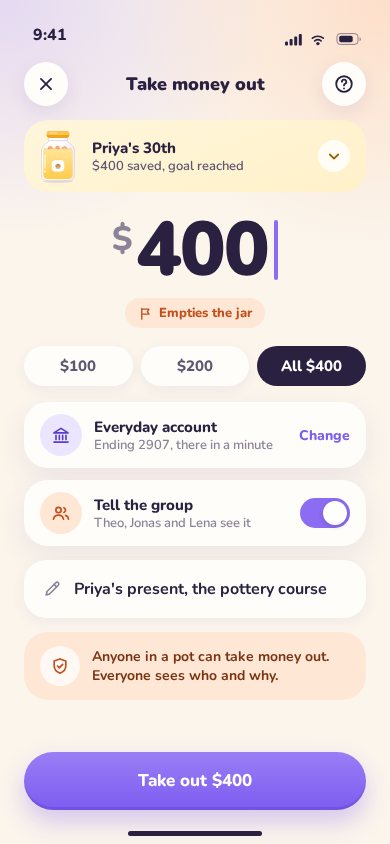
Burrow is a complete shared savings app: welcome, sign in, a code, a home with every pot as a filling jar, the pots list, a pot with its goal, members and activity, starting a pot, setting a goal, adding money on a keypad, saving rules such as round ups, a weekly rule and a payday rule, the shared timeline, members and invites, taking money out, a goal reached celebration, insights, linked accounts, a Plus plan, profile and settings. Each pot keeps one colour everywhere, from its jar to its progress bar.
| Detail | Value |
|---|---|
| Screen type | Checkout |
| App | Burrow: Shared savings pots |
| Category | Finance |
| Design language | Playful, light |
| Type | Nunito |
| Colours | #fbf5ec background, #fffdf9 surface, #2a2140 text, #8c8399 text-muted, #8b6cf2 accent, #ffffff accent-contrast, #ffa877 secondary, #efe6d8 border, #e5484d danger |
What this screen says
- Take money out
- Priya's 30th
- $400 saved, goal reached
- Empties the jar
- $100 $200 All $400
- Everyday account
- Ending 2907, there in a minute
- Change
- Tell the group
- Theo, Jonas and Lena see it
- Priya's present, the pottery course
- Anyone in a pot can take money out. Everyone sees who and why.
- Take out $400
Around it in Burrow
More booking and checkout screens
- Storefront Buy label: Run your online store
- Bastion Review transfer: Everyday banking from a big bank
- Later Checkout: Buy now, pay in four
- Standing Apply: Credit score and reports
- Accrue Review transfer: Retirement and pension planner
- Levy Pay estimate: Taxes for freelancers
- Bullion Review order: Gold and silver savings
- Wage Review: Get paid as you work
- Keystone Review payment: Mortgage and home loan tracker
- Rebate Review: Cashback card and rewards
- Aegis Review claim: Insurance policies and claims
- Till Cart: Card reader and sales for small shops
Every finance app checkout screen
What makes a good checkout screen
- Show the total early and honestly. Taxes, delivery and service fees should appear before the last step. A higher total on the final screen feels like a trick.
- Offer wallet payments. Apple Pay and Google Pay skip card typing entirely. Show them first when they are available.
- Ask for the minimum. Only the fields needed to deliver or book. Save details for next time.
- Let people review before paying. A clear summary of items, dates, address and price, with each part editable without starting over.
The full checkout screen guide and every example
Remix Burrow free: describe your own app and it is drawn in this design. Or get its files from $10: Figma, React Native, SwiftUI, Flutter and HTML.