Templates · Booking and checkout screens · Finance app · Aegis
Aegis Review claim screen
A checkout screen from Aegis, an insurance policies and claims app template in a Clinical style. Screen 13 of 25.
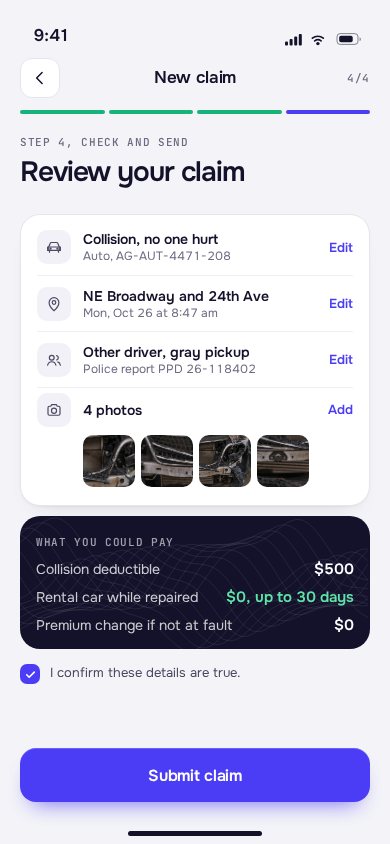
Aegis is a complete insurance app: welcome, sign in and a one time code, a home with every policy and the open claim, policies, an auto policy with limits and deductibles, a digital ID card, an Am I covered search, claims, a guided claim flow (what happened, incident details, damage photos, review, filed), a live claim tracker, roadside help with a tow truck on the map, repair shops, a home quote with checkout, billing, insights, an Aegis Plus plan, notifications, account and settings. Lavender white and white with deep indigo, ink, green for covered and amber for in review.
| Detail | Value |
|---|---|
| Screen type | Checkout |
| App | Aegis: Insurance policies and claims |
| Category | Finance |
| Design language | Clinical, light |
| Type | JetBrains Mono for headings, Onest for text |
| Colours | #f4f4f8 background, #ffffff surface, #14122b text, #6b6a80 text-muted, #4b3df5 accent, #ffffff accent-contrast, #0b8556 secondary, #e6e5ef border, #c93035 danger |
What this screen says
- New claim
- Step 4, check and send
- Review your claim
- Collision, no one hurt
- Auto, AG-AUT-4471-208
- Edit
- NE Broadway and 24th Ave
- Mon, Oct 26 at 8:47 am
- Other driver, gray pickup
- Police report PPD 26-118402
- 4 photos
- Add
- What you could pay
- Collision deductible $500
- Rental car while repaired $0, up to 30 days
- Premium change if not at fault $0
- I confirm these details are true.
- Submit claim
Around it in Aegis
More booking and checkout screens
- Halden Review transfer: Premium neobank
- Billable Start timer: Time tracking and invoices, kept like a ledger
- Lease Pay rent: Your tenancy, drawn to plan
- Claim Review and submit: Expenses, filed like a till receipt
- Divvy Review payment: Split bills with friends
- Ticker Review order: Stock investing
- Burrow Take money out: Shared savings pots
- Remit Delivery method: International money transfer
- Settle Review: Bill payments and banking
- Fathom Review order: Crypto wallet
- Marigold Review: Mobile banking
- Zentra Deposit: Crypto trading
Every finance app checkout screen
What makes a good checkout screen
- Show the total early and honestly. Taxes, delivery and service fees should appear before the last step. A higher total on the final screen feels like a trick.
- Offer wallet payments. Apple Pay and Google Pay skip card typing entirely. Show them first when they are available.
- Ask for the minimum. Only the fields needed to deliver or book. Save details for next time.
- Let people review before paying. A clear summary of items, dates, address and price, with each part editable without starting over.
The full checkout screen guide and every example
Remix Aegis free: describe your own app and it is drawn in this design. Or get its files from $10: Figma, React Native, SwiftUI, Flutter and HTML.