Templates · Booking and checkout screens · Finance app · Standing
Standing Apply screen
A checkout screen from Standing, a credit score and reports app template in a Minimal style. Screen 21 of 25.
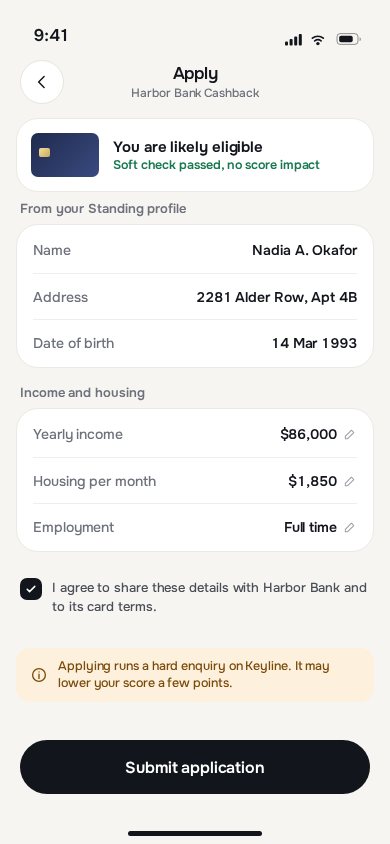
Standing is a complete credit score app: welcome, sign up and identity check, a home with the score dial and what changed, score history across two bureaus, the six score factors with card use and payment history in depth, the full report with accounts, an account page and enquiries, a dispute with confirmation, alerts with a was this you check, a score simulator, identity monitoring with a breach, matched card and loan offers clearly marked as offers with an application and a sent screen, a Plus plan, profile and settings. Paper and white with ink and a coral to green score scale.
| Detail | Value |
|---|---|
| Screen type | Checkout |
| App | Standing: Credit score and reports |
| Category | Finance |
| Design language | Minimal, light |
| Type | Fraunces for headings, Onest for text |
| Colours | #f6f5f1 background, #ffffff surface, #12151c text, #6d717b text-muted, #12151c accent, #ffffff accent-contrast, #4a4cf0 secondary, #e7e5de border, #d9442e danger |
What this screen says
- ApplyHarbor Bank Cashback
- You are likely eligible
- Soft check passed, no score impact
- From your Standing profile
- Name Nadia A. Okafor
- Address 2281 Alder Row, Apt 4B
- Date of birth 14 Mar 1993
- Income and housing
- Yearly income $86,000
- Housing per month $1,850
- Employment Full time
- I agree to share these details with Harbor Bank and to its card terms.
- Applying runs a hard enquiry on Keyline. It may lower your score a few points.
- Submit application
Around it in Standing
More booking and checkout screens
- Keel Pay bill: Corporate cards and spend controls
- Giftly Checkout: Gift cards, sent and stored
- Zap Review: Pay friends with a note
- Billfold Tap to pay: Cards, passes and tickets wallet
- Payly UPI PIN: UPI payments, recharges and bills
- Crest Payment: Credit card bills and rewards
- Storefront Buy label: Run your online store
- Bastion Review transfer: Everyday banking from a big bank
- Later Checkout: Buy now, pay in four
- Accrue Review transfer: Retirement and pension planner
- Levy Pay estimate: Taxes for freelancers
- Bullion Review order: Gold and silver savings
Every finance app checkout screen
What makes a good checkout screen
- Show the total early and honestly. Taxes, delivery and service fees should appear before the last step. A higher total on the final screen feels like a trick.
- Offer wallet payments. Apple Pay and Google Pay skip card typing entirely. Show them first when they are available.
- Ask for the minimum. Only the fields needed to deliver or book. Save details for next time.
- Let people review before paying. A clear summary of items, dates, address and price, with each part editable without starting over.
The full checkout screen guide and every example
Remix Standing free: describe your own app and it is drawn in this design. Or get its files from $10: Figma, React Native, SwiftUI, Flutter and HTML.