Templates · Booking and checkout screens · Finance app · Bastion
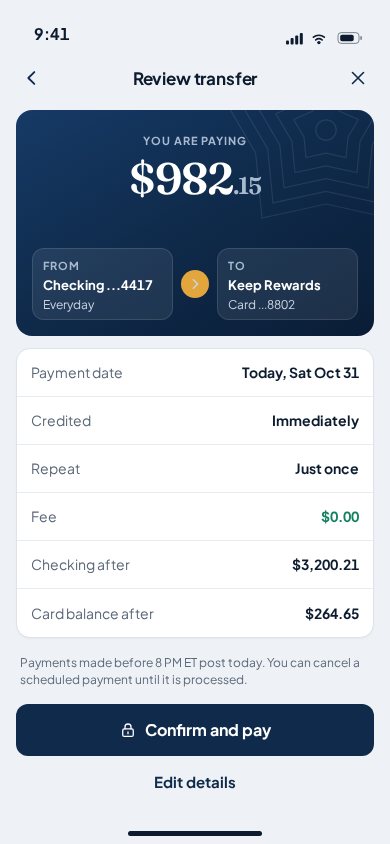
Bastion Review transfer screen
A checkout screen from Bastion, a finance app template in an Enterprise style. Screen 11 of 25.
Bastion is a complete big bank app: welcome, sign in, a one time code, an accounts overview, checking, savings and credit card pages, a transaction, the pay and transfer hub, a transfer with review and confirmation, send to a phone or email, bill pay, check deposit with a capture camera, card controls, spending insights, statements, a branch and ATM finder, alerts, secure messages, the Citadel premium tier, profile and settings. Cool grey and white with harbour navy, rampart gold and a quiet green for money in.
| Detail | Value |
|---|---|
| Screen type | Checkout |
| App | Bastion: Everyday banking from a big bank |
| Category | Finance |
| Design language | Enterprise, light |
| Type | Fraunces for headings, Plus Jakarta Sans for text |
| Colours | #eef1f5 background, #ffffff surface, #0c1b2e text, #5b6879 text-muted, #0f2a4a primary, #e3a63c accent, #13805f success, #2f6f9f secondary, #dde3ea border, #c2412d danger |
What this screen says
- Review transfer
- You are paying
- From
- Checking ...4417Everyday
- To
- Keep RewardsCard ...8802
- Payment date Today, Sat Oct 31
- Credited Immediately
- Repeat Just once
- Fee $0.00
- Checking after $3,200.21
- Card balance after $264.65
- Payments made before 8 PM ET post today. You can cancel a scheduled payment until it is processed.
- Confirm and pay
- Edit details
Around it in Bastion
More booking and checkout screens
- Payly UPI PIN: UPI payments, recharges and bills
- Crest Payment: Credit card bills and rewards
- Storefront Buy label: Run your online store
- Later Checkout: Buy now, pay in four
- Standing Apply: Credit score and reports
- Accrue Review transfer: Retirement and pension planner
- Levy Pay estimate: Taxes for freelancers
- Bullion Review order: Gold and silver savings
- Wage Review: Get paid as you work
- Keystone Review payment: Mortgage and home loan tracker
- Rebate Review: Cashback card and rewards
- Aegis Review claim: Insurance policies and claims
Every finance app checkout screen
What makes a good checkout screen
- Show the total early and honestly. Taxes, delivery and service fees should appear before the last step. A higher total on the final screen feels like a trick.
- Offer wallet payments. Apple Pay and Google Pay skip card typing entirely. Show them first when they are available.
- Ask for the minimum. Only the fields needed to deliver or book. Save details for next time.
- Let people review before paying. A clear summary of items, dates, address and price, with each part editable without starting over.
The full checkout screen guide and every example
Remix Bastion free: describe your own app and it is drawn in this design. Or get its files from $10: Figma, React Native, SwiftUI, Flutter and HTML.