Templates · Booking and checkout screens · Finance app · Keystone
Keystone Review payment screen
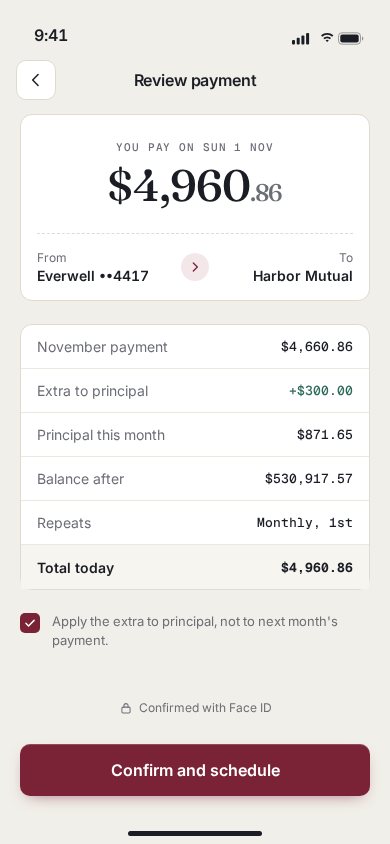
A checkout screen from Keystone, a mortgage and home loan tracker app template in an Enterprise style. Screen 10 of 25.
Keystone is a complete home loan tracker: welcome, sign in and linking a lender, a home with the equity arch and the next payment, loan details, the full amortization schedule, a payment breakdown and history, making a payment with extra principal, review and confirmation, a payoff planner, refinance offers with a break-even chart, a live rate lock, home value, property, escrow, equity and PMI removal, documents and a statement viewer, a Pro plan, notifications, profile and settings. Limestone and white with oxblood, verdigris and ochre.
| Detail | Value |
|---|---|
| Screen type | Checkout |
| App | Keystone: Mortgage and home loan tracker |
| Category | Finance |
| Design language | Enterprise, light |
| Type | Fraunces for headings, Inter for text |
| Colours | #f1efe9 background, #ffffff surface, #1a1d24 text, #6c6e76 text-muted, #7a2236 accent, #ffffff accent-contrast, #2e6b5b secondary, #dfdbd1 border, #b4361f danger |
What this screen says
- Review payment
- You pay on Sun 1 Nov
- From
- Everwell ••4417
- To
- Harbor Mutual
- November payment $4,660.86
- Extra to principal +$300.00
- Principal this month $871.65
- Balance after $530,917.57
- Repeats Monthly, 1st
- Total today $4,960.86
- Apply the extra to principal, not to next month's payment.
- Confirmed with Face ID
- Confirm and schedule
Around it in Keystone
More booking and checkout screens
- Settle Review: Bill payments and banking
- Fathom Review order: Crypto wallet
- Marigold Review: Mobile banking
- Zentra Deposit: Crypto trading
- Payday Review payroll: Payroll for small teams
- Roundup Review: Invest your spare change
- Envelope Reconcile: Give every dollar a job
- Recur Confirm cancel: Track and cancel subscriptions
- Keel Pay bill: Corporate cards and spend controls
- Giftly Checkout: Gift cards, sent and stored
- Zap Review: Pay friends with a note
- Billfold Tap to pay: Cards, passes and tickets wallet
Every finance app checkout screen
What makes a good checkout screen
- Show the total early and honestly. Taxes, delivery and service fees should appear before the last step. A higher total on the final screen feels like a trick.
- Offer wallet payments. Apple Pay and Google Pay skip card typing entirely. Show them first when they are available.
- Ask for the minimum. Only the fields needed to deliver or book. Save details for next time.
- Let people review before paying. A clear summary of items, dates, address and price, with each part editable without starting over.
The full checkout screen guide and every example
Remix Keystone free: describe your own app and it is drawn in this design. Or get its files from $10: Figma, React Native, SwiftUI, Flutter and HTML.