Templates · Onboarding screens · Productivity app · Bench
Bench Welcome screen
An onboarding screen from Bench, a freelance marketplace app template in an Enterprise style. Screen 1 of 25.
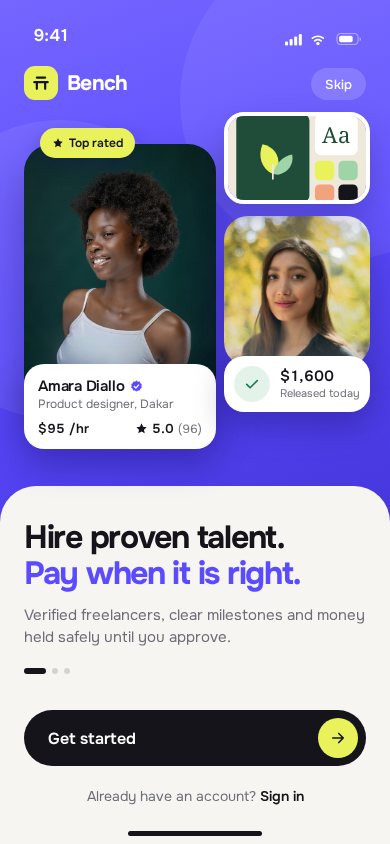
Bench is a complete freelance marketplace for clients: onboarding, role choice and sign in, a home with the contract that needs attention and top rated talent, categories, search with filters, a freelancer profile with portfolio, packages and reviews, posting a job with budget and timeline, proposals ranked by match score, messages and chat, sending an offer, a contract with a milestone timeline and escrow, milestone review, funding escrow, payments, leaving a review, profile and settings. Off white and white with ink, violet and lemon.
| Detail | Value |
|---|---|
| Screen type | Onboarding |
| App | Bench: Freelance marketplace |
| Category | Productivity |
| Design language | Enterprise, light |
| Type | Onest |
| Colours | #f6f5f2 background, #ffffff surface, #14141a text, #6e6e7a text-muted, #5b4bff accent, #ffffff accent-contrast, #e9f25b secondary, #e8e6e0 border, #d9453d danger |
What this screen says
- Bench
- Skip
- Top rated
- Amara Diallo Product designer, Dakar
- $95 /hr 5.0 (96)
- $1,600Released today
- Hire proven talent.
- Pay when it is right.
- Verified freelancers, clear milestones and money held safely until you approve.
- Get started
- Already have an account? Sign in
Around it in Bench
More onboarding screens
- Polish Welcome: Writing assistant and keyboard
- Tapline Welcome: Link-in-bio pages and analytics
- Quill Welcome: Docs, wikis and databases in one workspace
- Tandem Welcome: Team chat, channels and huddles
- Shipyard Welcome: Issue tracking for product teams
- Canvas Welcome: Design files and comments on mobile
- Merge Welcome: Code, pull requests and reviews
- Query Welcome: AI answers with sources
- Glossa Welcome: Translate text, voice and camera
- Layout Welcome: Design anything from templates
- Tick Welcome: To-do lists and reminders
- Beacon Welcome: Find your devices and people
Every productivity app onboarding screen
What makes a good onboarding screen
- One idea per screen. Each screen should say one thing in a headline people can read in a second. If a screen needs a paragraph, it is doing too much.
- Personalise with a purpose. Ask a question only if the answer changes what people see next, like a goal, a level or an interest. Then show that the answer mattered.
- Explain permissions before asking. Show your own screen saying why you need notifications, location or the camera before the system prompt. People who understand the reason are more likely to allow it.
- Let people skip. A visible skip or "I'll do this later" respects returning users and the impatient. Make sure skipping still lands them somewhere useful.
The full onboarding screen guide and every example
Remix Bench free: describe your own app and it is drawn in this design. Or get its files from $10: Figma, React Native, SwiftUI, Flutter and HTML.