Templates · Detail screens · Productivity app · Bench
Bench Milestone review screen
A detail screen from Bench, a freelance marketplace app template in an Enterprise style. Screen 20 of 25.
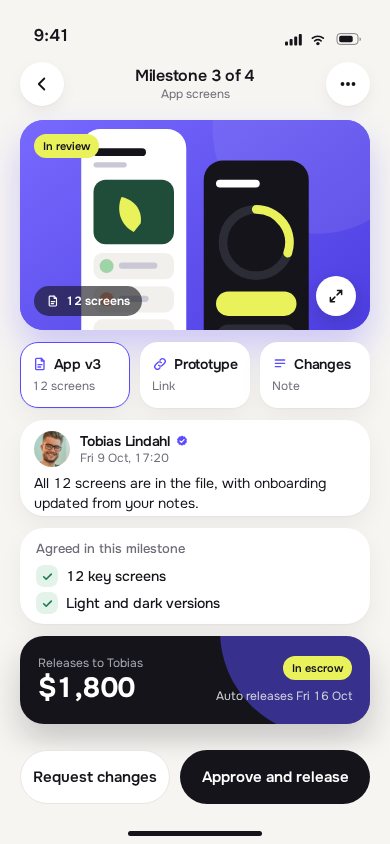
Bench is a complete freelance marketplace for clients: onboarding, role choice and sign in, a home with the contract that needs attention and top rated talent, categories, search with filters, a freelancer profile with portfolio, packages and reviews, posting a job with budget and timeline, proposals ranked by match score, messages and chat, sending an offer, a contract with a milestone timeline and escrow, milestone review, funding escrow, payments, leaving a review, profile and settings. Off white and white with ink, violet and lemon.
| Detail | Value |
|---|---|
| Screen type | Detail |
| App | Bench: Freelance marketplace |
| Category | Productivity |
| Design language | Enterprise, light |
| Type | Onest |
| Colours | #f6f5f2 background, #ffffff surface, #14141a text, #6e6e7a text-muted, #5b4bff accent, #ffffff accent-contrast, #e9f25b secondary, #e8e6e0 border, #d9453d danger |
What this screen says
- Milestone 3 of 4App screens
- In review 12 screens
- App v312 screens
- PrototypeLink
- ChangesNote
- Tobias Lindahl Fri 9 Oct, 17:20
- All 12 screens are in the file, with onboarding updated from your notes.
- Agreed in this milestone
- 12 key screens Light and dark versions
- Releases to Tobias $1,800
- In escrow Auto releases Fri 16 Oct
- Request changes
- Approve and release
Around it in Bench
More detail screens
- Scanly Document: Document scanner
- Keyring Login: Password manager
- Rota Shift detail: Shift scheduling for hourly teams
- Inkwell Entry: Daily journal
- Shortlist Job: Job search and application tracker
- Parley Chat: Team messenger
- Docket Task: Task and sprint planner
- Kanso Project: Tasks, calendar and chat
- Margin Notebook: AI note taking
- Aide Meeting brief: Executive AI assistant
- Juno Chat: AI chat assistant
- Opal Project: Studio dashboard
Every productivity app detail screen
What makes a good detail screen
- Lead with what identifies the item. A large image or title, the price or status, and the key facts at the top. People should know they are in the right place at a glance.
- Keep the main action visible. A sticky bottom button for Add to cart, Book or Play stays reachable while people scroll through details.
- Order information by importance. The facts that decide the choice come first; reviews, specifications and fine print further down.
- Use progressive disclosure. Long descriptions, specifications and policies can expand on tap rather than filling the screen.
The full detail screen guide and every example
Remix Bench free: describe your own app and it is drawn in this design. Or get its files from $10: Figma, React Native, SwiftUI, Flutter and HTML.