Templates · Player, camera and editor screens · Finance app · Zap
Zap Scan screen
A media screen from Zap, a pay friends with a note app template in a Playful style. Screen 17 of 25.
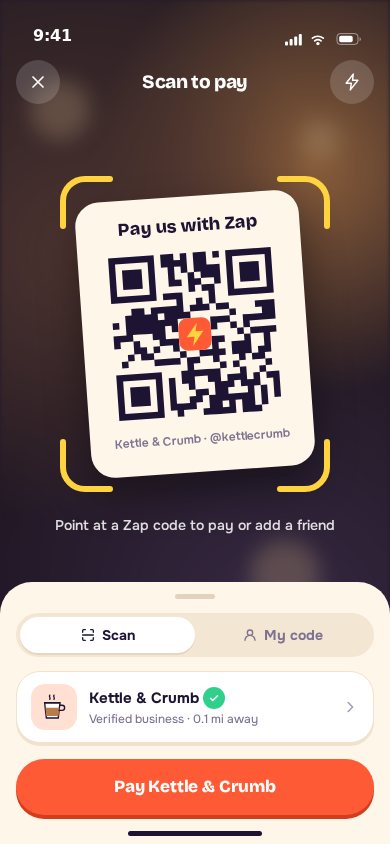
Zap is a complete peer to peer payments app: welcome, phone sign in and code, a friends feed of notes and stickers, a wallet with balance and the Zap card, pay with a number pad, picking a friend, writing a note, review and a sent confetti screen, request, split a bill, a payment with likes and comments, a friend with your history, activity, open requests, scan to pay, the debit card, cash out, monthly insights, a group pot for a trip, a Plus plan, notifications, profile and settings. Warm cream and white with plum ink, tangerine and lemon.
| Detail | Value |
|---|---|
| Screen type | Media |
| App | Zap: Pay friends with a note |
| Category | Finance |
| Design language | Playful, light |
| Type | Bricolage Grotesque for headings, Onest for text |
| Colours | #fff6ea background, #ffffff surface, #1d1433 text, #7d7391 text-muted, #ff5a36 accent, #ffffff accent-contrast, #ffd23f secondary, #f0e2cd border, #e5383b danger |
What this screen says
- Scan to pay
- Pay us with Zap Kettle & Crumb · @kettlecrumb
- Point at a Zap code to pay or add a friend
- Scan My code
- Kettle & Crumb Verified business · 0.1 mi away
- Pay Kettle & Crumb
Around it in Zap
More player, camera and editor screens
- Marigold Scan: Mobile banking
- Keel Snap receipt: Corporate cards and spend controls
- Giftly Message: Gift cards, sent and stored
- Billfold Scan card: Cards, passes and tickets wallet
- Payly Scan QR: UPI payments, recharges and bills
- Bastion Capture check: Everyday banking from a big bank
- Accrue Adviser call: Retirement and pension planner
- Levy Scan receipt: Taxes for freelancers
- Wage Clock in: Get paid as you work
- Keystone Statement: Mortgage and home loan tracker
- Rebate Scratch card: Cashback card and rewards
- Aegis Damage photos: Insurance policies and claims
Every finance app media screen
What makes a good media player screen
- Content takes the space. Artwork, video or the camera view should fill most of the screen.
- Primary controls in the thumb zone. Play and pause, the shutter or the main tool, large and low on the screen.
- Show progress and position. A scrubber with elapsed and remaining time, or the step in a lesson.
- Hide secondary controls until needed. Lyrics, queue, filters and advanced tools can live behind a tap or a swipe.
The full media player screen guide and every example
Remix Zap free: describe your own app and it is drawn in this design. Or get its files from $10: Figma, React Native, SwiftUI, Flutter and HTML.