Templates · Detail screens · Finance app · Zap
Zap card screen
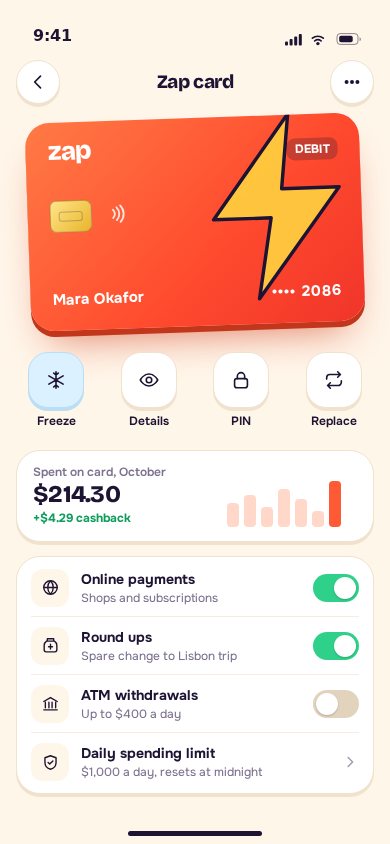
A detail screen from Zap, a pay friends with a note app template in a Playful style. Screen 18 of 25.
Zap is a complete peer to peer payments app: welcome, phone sign in and code, a friends feed of notes and stickers, a wallet with balance and the Zap card, pay with a number pad, picking a friend, writing a note, review and a sent confetti screen, request, split a bill, a payment with likes and comments, a friend with your history, activity, open requests, scan to pay, the debit card, cash out, monthly insights, a group pot for a trip, a Plus plan, notifications, profile and settings. Warm cream and white with plum ink, tangerine and lemon.
| Detail | Value |
|---|---|
| Screen type | Detail |
| App | Zap: Pay friends with a note |
| Category | Finance |
| Design language | Playful, light |
| Type | Bricolage Grotesque for headings, Onest for text |
| Colours | #fff6ea background, #ffffff surface, #1d1433 text, #7d7391 text-muted, #ff5a36 accent, #ffffff accent-contrast, #ffd23f secondary, #f0e2cd border, #e5383b danger |
What this screen says
- Zap card
- zap DEBIT Mara Okafor •••• 2086
- Freeze
- Details
- PIN
- Replace
- Spent on card, October$214.30+$4.29 cashback
- Online paymentsShops and subscriptions
- Round upsSpare change to Lisbon trip
- ATM withdrawalsUp to $400 a day
- Daily spending limit$1,000 a day, resets at midnight
Around it in Zap
More detail screens
- Fathom Coin: Crypto wallet
- Marigold Card details: Mobile banking
- Zentra Coin: Crypto trading
- Payday Pay run: Payroll for small teams
- Roundup Purchase: Invest your spare change
- Envelope Category: Give every dollar a job
- Recur Subscription: Track and cancel subscriptions
- Keel Card: Corporate cards and spend controls
- Giftly Shop: Gift cards, sent and stored
- Billfold Card: Cards, passes and tickets wallet
- Payly Chat: UPI payments, recharges and bills
- Crest Card: Credit card bills and rewards
Every finance app detail screen
What makes a good detail screen
- Lead with what identifies the item. A large image or title, the price or status, and the key facts at the top. People should know they are in the right place at a glance.
- Keep the main action visible. A sticky bottom button for Add to cart, Book or Play stays reachable while people scroll through details.
- Order information by importance. The facts that decide the choice come first; reviews, specifications and fine print further down.
- Use progressive disclosure. Long descriptions, specifications and policies can expand on tap rather than filling the screen.
The full detail screen guide and every example
Remix Zap free: describe your own app and it is drawn in this design. Or get its files from $10: Figma, React Native, SwiftUI, Flutter and HTML.