Templates · Home screens · Fitness app · Ward
Ward Home screen
A home screen from Ward, a health and fitness app template in a Clinical style. Screen 4 of 25.
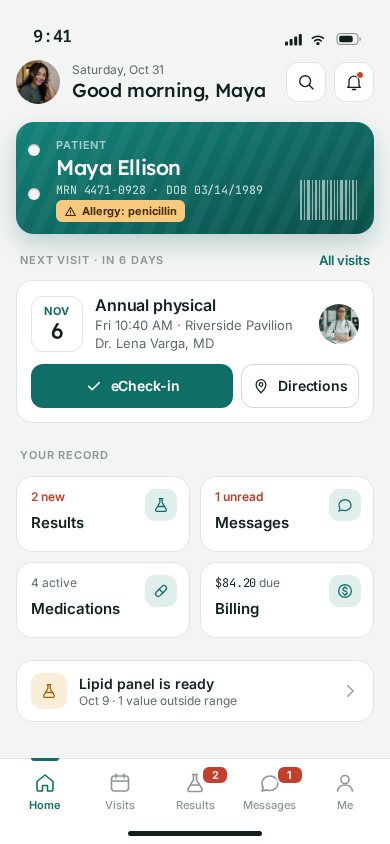
Ward is a complete patient portal for the invented Larkfield Health network: welcome, sign in and a verification code, a home with the patient wristband and the next visit, visits, a visit with directions, a five step eCheck-in and arrival code, finding care and scheduling, a video visit, test results with reference ranges, a lipid panel, a trend over time, secure messages with the care team, a new message, medications and refills, billing and paying a bill, a health summary, notifications, family access and settings. Paper grey and white with spruce teal and a quiet amber.
| Detail | Value |
|---|---|
| Screen type | Home |
| App | Ward: Patient portal for results, visits and messages |
| Category | Health and fitness |
| Design language | Clinical, light |
| Type | Lexend for headings, Inter for text |
| Colours | #f2f5f4 background, #ffffff surface, #10201e text, #5c6b68 text-muted, #0f6e66 accent, #ffffff accent-contrast, #e1efec secondary, #dfe5e3 border, #c2412d danger |
What this screen says
- Saturday, Oct 31
- Good morning, Maya
- Patient
- Maya Ellison
- MRN 4471-0928 · DOB 03/14/1989
- Allergy: penicillin
- Next visit · in 6 days
- All visits
- NOV 6
- Annual physical
- Fri 10:40 AM · Riverside Pavilion
- Dr. Lena Varga, MD
- eCheck-in
- Directions
- Your record
- 2 new Results
- 1 unread Messages
- 4 active Medications
- $84.20 due Billing
- Lipid panel is readyOct 9 · 1 value outside range
- Home
- Visits
- 2Results
- 1Messages
- Me
Around it in Ward
More home screens
- Sip Today: Water intake and hydration
- Mend Today: Physio and rehab exercises
- Tabata Home: HIIT interval timer
- Jab Home: Boxing workouts with a smart bag
- Exhale Today: Breathwork sessions
- Bump Today: Pregnancy week by week
- Locker Home: Gym membership and class booking
- Morsel Home: AI calorie tracker
- Dew Home: AI skin scan and routine
- Cradle Home: Baby tracker
- Medly Home: Doctor on call
- Donor Home: Blood donation, counted drop by drop
What makes a good home screen
- Put the most important thing first. Decide the one thing most people come for, like today's workout, a balance or the next booking, and give it the top of the screen.
- Make it feel current. Greetings with the time of day, today's date, fresh numbers and recent activity tell people the app is alive and about them.
- Keep quick actions within thumb reach. The two or three things people do most should be one tap away, in the lower part of the screen or a floating button.
- Group related content in clear sections. Use headings and spacing so the screen scans as a few blocks, not a long mixed list.
The full home screen guide and every example
Remix Ward free: describe your own app and it is drawn in this design. Or get its files from $10: Figma, React Native, SwiftUI, Flutter and HTML.