Templates · Home screens · Fitness app · Donor
Donor Home screen
A home screen from Donor, a health and fitness app template in a Clinical style. Screen 5 of 25.
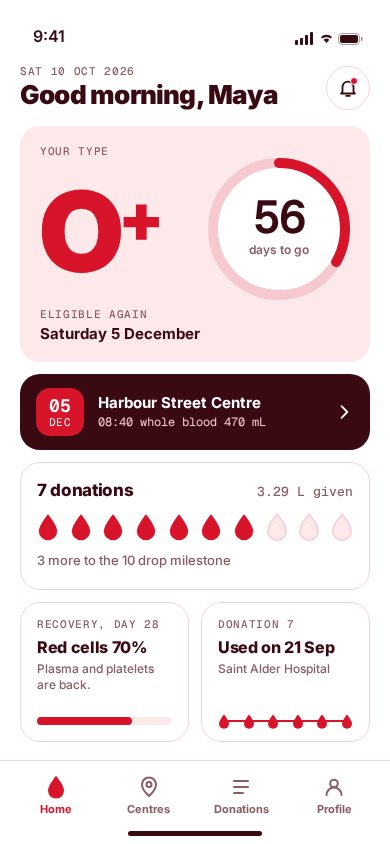
Donor is donor covers giving blood end to end: an eligibility checklist with big yes and no toggles, centres on a drawn map, slot booking and check in, a countdown ring to your next eligible date, recovery by blood component and a journey line from arm to hospital. It also has donation history, impact, stock levels, compatibility, milestones, a donor card, notifications, profile and settings.
| Detail | Value |
|---|---|
| Screen type | Home |
| App | Donor: Blood donation, counted drop by drop |
| Category | Health and fitness |
| Design language | Clinical, light |
| Type | Inter |
| Colours | #ffffff background, #fde8ea surface, #3a0a12 text, #8a5d63 text-muted, #d7142a accent, #ffffff accent-contrast, #f3d3d7 border, #1f8a5b success |
What this screen says
- Sat 10 Oct 2026
- Good morning, Maya
- Your type
- O+
- Eligible again
- Saturday 5 December
- 56days to go
- 05Dec
- Harbour Street Centre08:40 whole blood 470 mL
- 7 donations3.29 L given
- 3 more to the 10 drop milestone
- Recovery, day 28
- Red cells 70%
- Plasma and platelets are back.
- Donation 7
- Used on 21 Sep
- Saint Alder Hospital
- Home
- Centres
- Donations
- Profile
Around it in Donor
More home screens
- Exhale Today: Breathwork sessions
- Bump Today: Pregnancy week by week
- Locker Home: Gym membership and class booking
- Morsel Home: AI calorie tracker
- Dew Home: AI skin scan and routine
- Cradle Home: Baby tracker
- Medly Home: Doctor on call
- Unfold Home: Yoga and stretching
- Kilo Home: Strength training log
- Cyra Today: Cycle tracker
- Harbor Home: Therapy and mood
- Fasten Home: Intermittent fasting
What makes a good home screen
- Put the most important thing first. Decide the one thing most people come for, like today's workout, a balance or the next booking, and give it the top of the screen.
- Make it feel current. Greetings with the time of day, today's date, fresh numbers and recent activity tell people the app is alive and about them.
- Keep quick actions within thumb reach. The two or three things people do most should be one tap away, in the lower part of the screen or a floating button.
- Group related content in clear sections. Use headings and spacing so the screen scans as a few blocks, not a long mixed list.
The full home screen guide and every example
Remix Donor free: describe your own app and it is drawn in this design. Or get its files from $10: Figma, React Native, SwiftUI, Flutter and HTML.