Templates · Home screens · Fitness app · Jab
Jab Home screen
A home screen from Jab, a health and fitness app template in a Dark-first style. Screen 4 of 25.
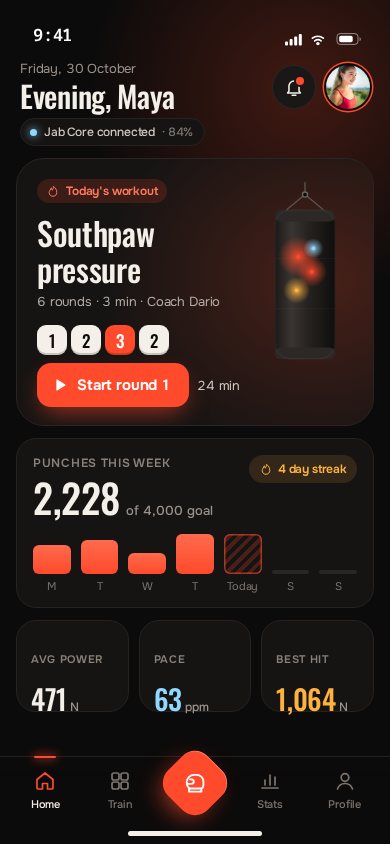
Jab is a complete smart bag boxing app: welcome, pairing the bag sensor, sign in, a home with today's workout and the week's output, workouts and a workout page with its combos, a coach, a live round with a round timer and a glowing bag, the rest between rounds, a class video, a finished workout, a round by round session, stats, a punch map, history, a combo builder, challenges and a leaderboard, booking a 1:1 with a coach and its confirmation, the smart bag, a Pro plan, notifications, profile and settings. Warm black with glove red, amber and ice blue.
| Detail | Value |
|---|---|
| Screen type | Home |
| App | Jab: Boxing workouts with a smart bag |
| Category | Health and fitness |
| Design language | Dark-first, dark |
| Type | Oswald for headings, Onest for text |
| Colours | #0c0b0b background, #161413 surface, #f4efe8 text, #9a918a text-muted, #ff4a2b accent, #ffffff accent-contrast, #ffb23e secondary, #262220 border, #8fd8ff success |
What this screen says
- Friday, 30 October
- Evening, Maya
- Jab Core connected · 84%
- Today's workout
- Southpaw pressure
- 6 rounds · 3 min · Coach Dario
- Start round 1
- 24 min
- Punches this week
- 2,228of 4,000 goal
- 4 day streak
- Today
- Avg power
- 471N
- Pace
- 63ppm
- Best hit
- 1,064N
- Home
- Train
- Stats
- Profile
Around it in Jab
More home screens
- Level Today: Glucose monitor companion
- Reformer Today: Pilates studio booking
- Sip Today: Water intake and hydration
- Mend Today: Physio and rehab exercises
- Tabata Home: HIIT interval timer
- Exhale Today: Breathwork sessions
- Bump Today: Pregnancy week by week
- Locker Home: Gym membership and class booking
- Morsel Home: AI calorie tracker
- Dew Home: AI skin scan and routine
- Cradle Home: Baby tracker
- Medly Home: Doctor on call
What makes a good home screen
- Put the most important thing first. Decide the one thing most people come for, like today's workout, a balance or the next booking, and give it the top of the screen.
- Make it feel current. Greetings with the time of day, today's date, fresh numbers and recent activity tell people the app is alive and about them.
- Keep quick actions within thumb reach. The two or three things people do most should be one tap away, in the lower part of the screen or a floating button.
- Group related content in clear sections. Use headings and spacing so the screen scans as a few blocks, not a long mixed list.
The full home screen guide and every example
Remix Jab free: describe your own app and it is drawn in this design. Or get its files from $10: Figma, React Native, SwiftUI, Flutter and HTML.